Good day,
I am new here, did some limited experimenting with Dynamo. This time, I want to use Dynamo to create a window schedule, using the windows used in the project.
Now, I have it so far that the windows are placed (using the Genius Loci Pacgage) but I am stuck with 2 things:
- the windows should all line up at the top
- I want the WIndow Type mark and quantity below each window.
I dont know how to do that. Any help perhaps? I cannot upload my graph, but used this as an example:
How to use the "create legend component" node in the Genius Loci package"
Thanks in advance
Hi,
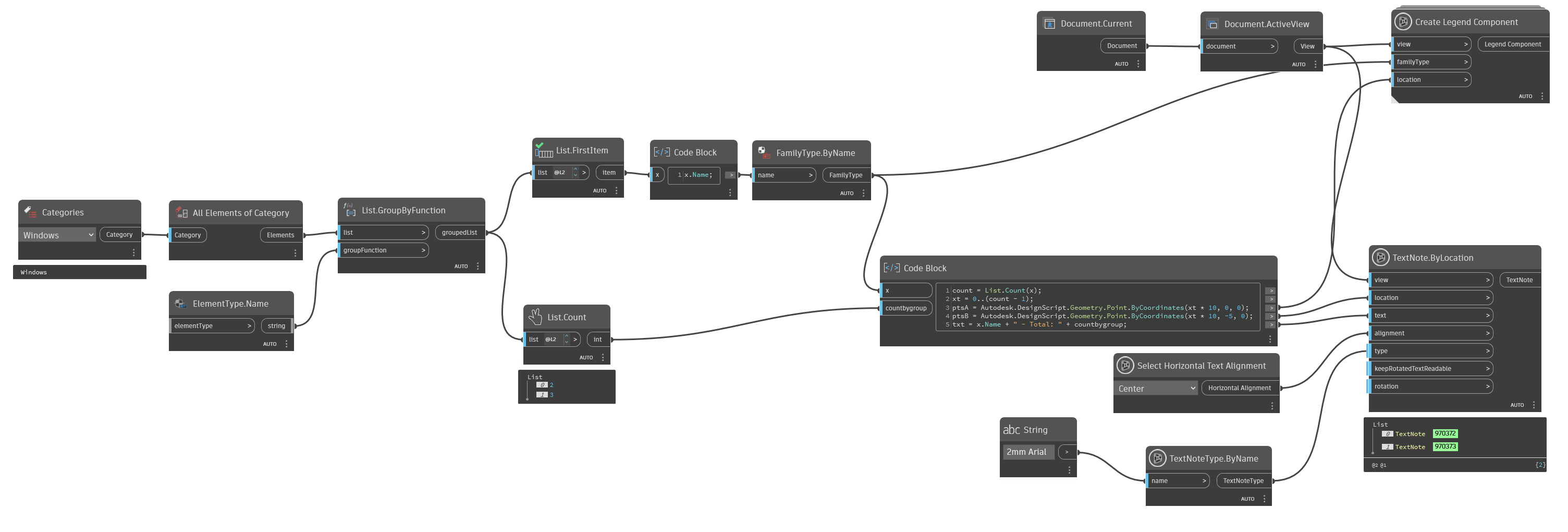
Here is an example (with horizontal points generated)
the result
Awesome, thanks. I got it ALMOST to work, but my windows and text are all on top of each other, Guess it have to do with spacing, byt cant find the error.
Also, seems like there is duplicates of each window place over each other.
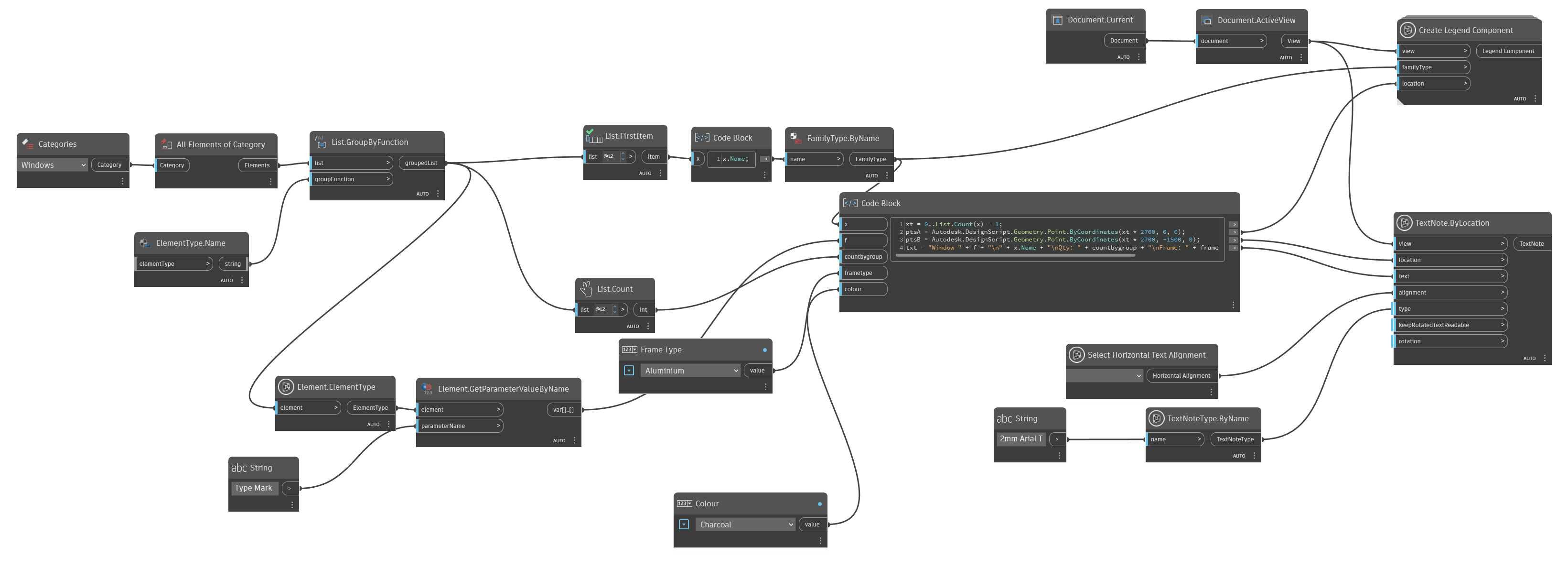
Here’s my blocks.
Try to increase this values (for my test, project’s unit was in meter)
Thanks you are right, I’ve figured it out. Appreciate.
I found that all the elements are duplicates though, placed acactly on top of each other. When moving, for example I have to move 2 instances.
edit: I saw that only occurs when I have more than one instance in my project.
Herewith my graph:
Is it possible to dimension these windows also with dynamo?
Thanks, appreciate!
Strange, you execute the graph in manual mode ?, can you share a simple rvt file ?
It’s probably possible (never tried), but it requires special development (Python or C#).
Hi @JACOBS12 you could try play around with something here…but guess the original already have a solution, so just mark Cyrils solution, so it could help other as well 
I found it have something to do with Alle ELements of Category > List.GroupByFunction. I have plugged in List.UniqueItems inbetween, now the windows are not duplicated. But soon as I plug that into the name and Qty, the Qty change to 1 only. So to get the Qty, I cant do Unique Items. Dont know how to get around that though. Ive done a manual run, and also via DynamoPlayer, and tested in different rvt files. Same issue. I would have a qty of 4 of teh same windows in the project for example, and in the legend when run, it place only one instance of each window, but 4 instances of the text
Here is my graph
You could try using the Python script directly (to see if there’s a difference)
#Idea by Oliwer Kulpa : https://thebuildingcoder.typepad.com/blog/2010/05/duplicate-legend-component.html
import clr
# Import RevitAPI Classes
clr.AddReference('RevitAPI')
import Autodesk
from Autodesk.Revit.DB import *

clr.AddReference("RevitNodes")
import Revit
clr.ImportExtensions(Revit.GeometryConversion)

# Import DocumentManager and TransactionManager
clr.AddReference("RevitServices")
import RevitServices
from RevitServices.Persistence import DocumentManager
from RevitServices.Transactions import TransactionManager

doc = DocumentManager.Instance.CurrentDBDocument

view = UnwrapElement(IN[0]) if isinstance(IN[0],list) else [UnwrapElement(IN[0])]
view=view[0]
family_types = UnwrapElement(IN[1]) if isinstance(IN[1],list) else [UnwrapElement(IN[1])]
translations = IN[2] if isinstance(IN[2],list) else [IN[2]]
output=[]

existing_legend_component = FilteredElementCollector(doc, view.Id).OfCategory(BuiltInCategory.OST_LegendComponents).FirstElement()
# Get the location of the existing_legend_component
box = existing_legend_component.get_BoundingBox(view)
mid = (box.Min.Add(box.Max)).Multiply(0.5)

# Start Transaction
TransactionManager.Instance.EnsureInTransaction(doc)
for translation,family_type in zip(translations,family_types):
    # Copy the existing legend component at the correct location
    new_legend_component = ElementTransformUtils.CopyElement(doc, existing_legend_component.Id,translation.ToRevitType().Subtract(mid))
    # Change the family type of the new element
    doc.GetElement(new_legend_component[0]).get_Parameter(BuiltInParameter.LEGEND_COMPONENT).Set(family_type.Id)
    output.append(doc.GetElement(new_legend_component[0]))
doc.Regenerate()
# End Transaction
TransactionManager.Instance.TransactionTaskDone()

OUT=output
here is the dyn
create_horizontal_doors_legend_DYN3_v0.1.dyn (32.9 KB)
Guess we can use copy by vector from clockwork as well and then set the family, should work in legend also
and something here for create dimensison in legend…

Somehow I am missing something - Attached my DYN file, maybe someone can find what I am missing. Get this error
BAK_Window Schedule.dyn (232.4 KB)