Hi, I’m looking for creating a Dynamo routine for Autodesk Civil 3D 2024. I am not a dynamo user friendly. I need some to help with this even if will pay for it.
Scope of Work:
Automate the creation of 3D lines (rock bolts) perpendicular to the tunnel body (Corridor).
The placement should follow the tunnel profile (Corridor).
Allow placement of the bolts at a range of chainages along the tunnel alignment.
A working Dynamo script (.dyn) with user-friendly inputs (e.g., spacing, length, chainage range).
The Dynamo should allow me to:
-Choose the corridor.
-Specify the alignment or can get it from the selected corridor.
-Define the bolt pattern (centered / staggered).
-Set the spacing between bolts(3d lines).
-Input the length of the bolts(3d lines).
-Add all lines on a layer and label the layer with corresponding lines on the profile view. e.g. profile view at chainage 15, all lines on it will use Ch15-RB-001, Ch15-RB-002, Ch15-RB-003 and so on.
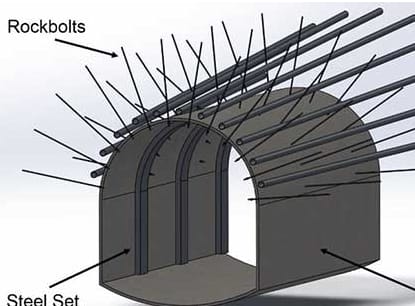
The bolt pattern: