Hi, I need help with a Revit family problem:
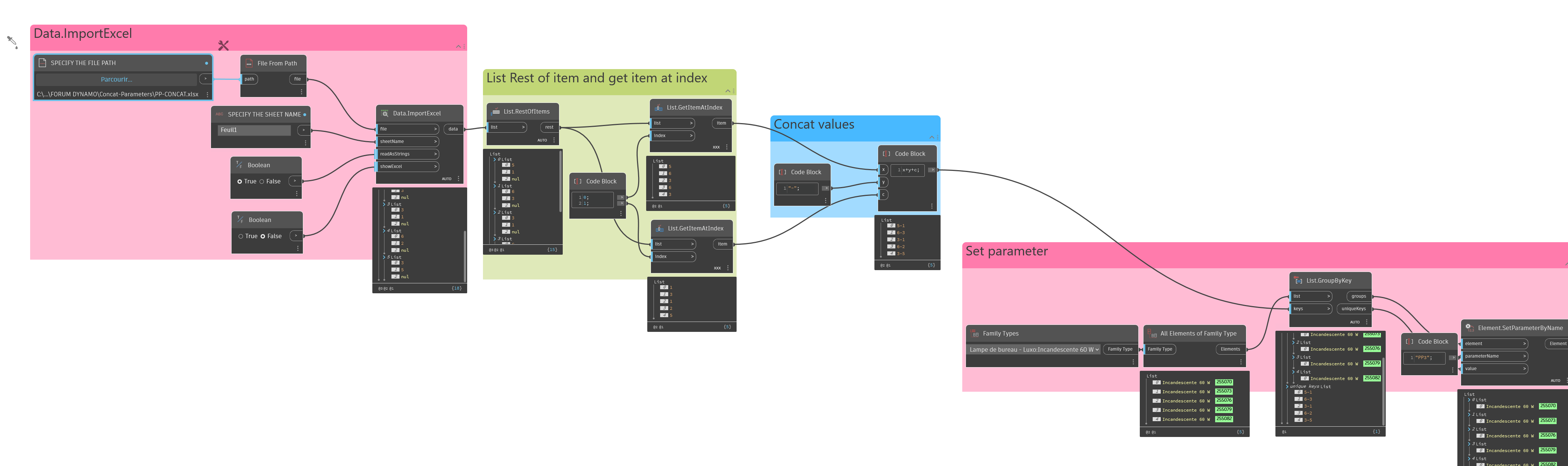
I want to concatenate the values of two parameters, “ConcreteClass” and “BondConditions”, in a family, and save the result in a third parameter, “Key”. In Excel, this would look like CONCATENATE(ConcreteClass, "_", BondConditions). Then, I’d use a lookup formula to match this “Key” value with a CSV file and return a corresponding value based on “Rebar Diameter”.
Since Revit doesn’t allow concatenation in family parameters directly, I thought about using Dynamo. My goal is to use Dynamo to concatenate the values and update the “Key” parameter, or alternatively, read the CSV and directly return the value based on the combination of parameters.
I’ve tried using Dynamo helped by AI, but I can’t get FamilyDocument.GetParameterValueByName to work.
Any ideas how could I solve this?
Thanks in advance.

 …for get parameter value in a family document, you could try as here