Hi There,
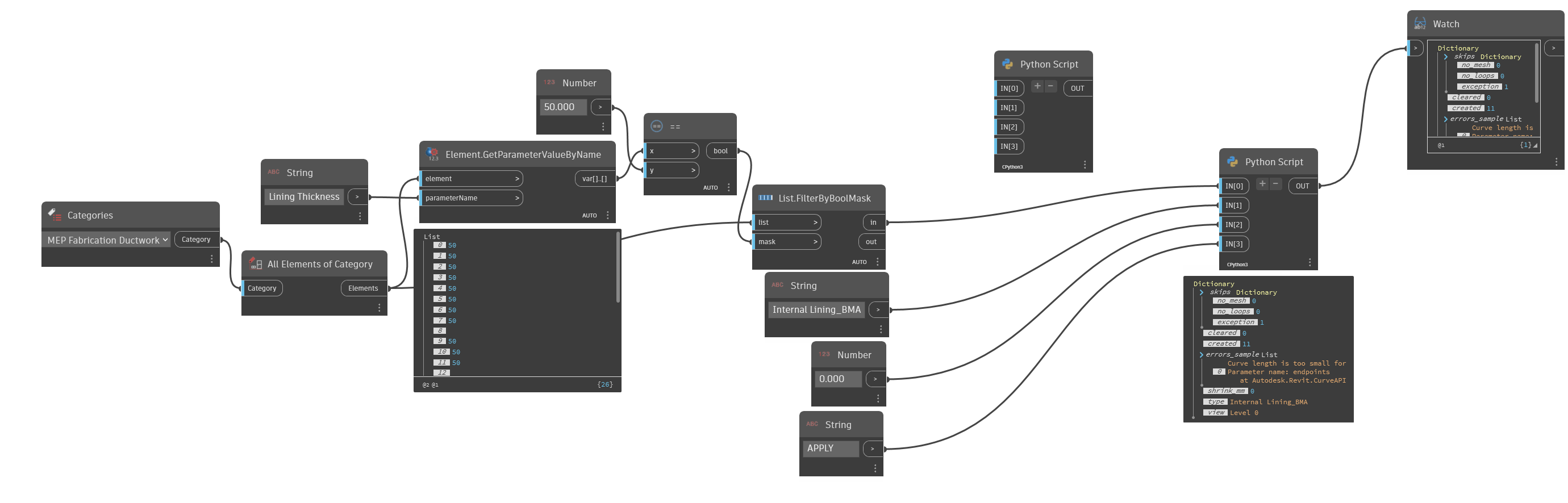
I am trying to develop a way to use Dynamo to “trace” Fabrication Parts and apply a hatch pattern to to the view depending on the insulation type, thickness, etc. I have filtered parts by the lining thickness type and have a python script that is applying a bounding box to these elements. The issue I am having is trying to make irregular shapes like all the fittings.
This is not something I can use a filter for like native revit families due to the way Fab Parts work. I am unable to extract face geometry from the Fab Parts to project a hatch to and tried a few different option in my script to to do different things to extract the shapes but always getting the same result with rectangular bounding boxes.
I can share any further info like the scripts I have tried if that helps diagnose the issue.
I can’t help but think that applying a graphic override is a better practice here…
You’re up against a few hurdles which aren’t insignificant, in particular harvesting the geometry of fabrication parts is known to be cumbersome. You’ll also run into ‘too short of a line’ errors, as well as a lot of confusion with overlapping elements as the hatch ‘hides’ what is below it or is hidden by the elements…
So before you start down the path, can you help me to understand your reasoning for wanting to build this solution?
Something we are finding is that clients don’t like the look of drawings with Fab Parts due to the lack of hatch pattern. This is a fairly common “standard” in Australia to have a hatch for insulation types which is obviously easy with native families. Using Fab Parts is so much quicker and efficient so would be better to use this as our standard if we can change perception by the drawings looking the same or similar.
I have worked out that the Fab Parts are basically a mesh and have been able to extract that data to use as a projection and was able to get all parts to trace correctly. This is just a filled region over all pieces added from the python script.
Now I need to try make it a little less cumbersome and able to apply different patterns by lining/inulation thickness and type.
I haven’t worked with fab parts in some time - can you not set their surface pattern to an override with filters?
There is no surface pattern available on Fab Parts. We can’t apply a regular filter in VG searching MEP Fabrication Ductwork > lining type = 50 for example as insluation and linings are not an available parameter in the filters.