Hello,
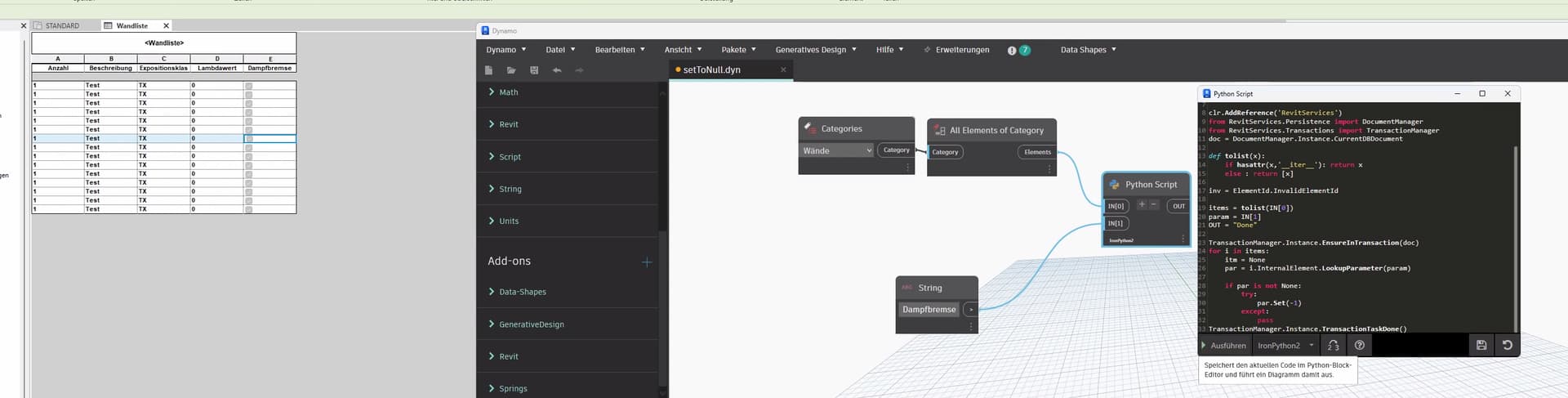
i am pretty surpriced that this works. I can set a boolean to default (grey)
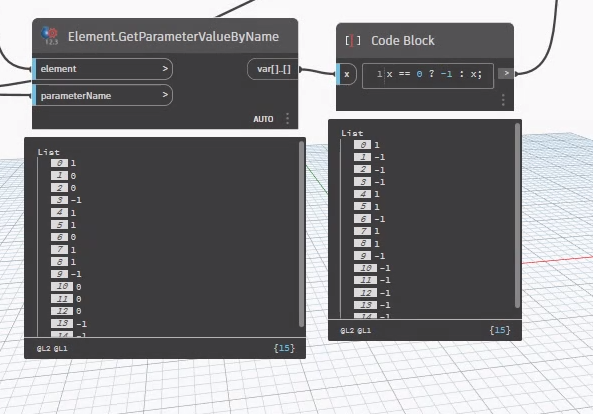
in python methode works well but not for codeblock.
import clr

clr.AddReference('RevitAPI')
from Autodesk.Revit.DB import ElementId

clr.AddReference('RevitServices')
from RevitServices.Persistence import DocumentManager
from RevitServices.Transactions import TransactionManager
doc = DocumentManager.Instance.CurrentDBDocument

def tolist(x):
	if hasattr(x,'__iter__'): return x
	else : return [x]

inv = ElementId.InvalidElementId

items = tolist(IN[0])
param = IN[1]
OUT = "Done"

TransactionManager.Instance.EnsureInTransaction(doc)
for i in items:
	itm = None
	par = i.InternalElement.LookupParameter(param)

	if par is not None:
		try:
			par.Set(-1)
		except:
			pass
TransactionManager.Instance.TransactionTaskDone()
for string i can use "" but how about numbers and units? is there a way to set None ?
The python method uses an ElementId. The value in the code block is just an integer. 0 and 1 are valid boolean values, but even the python (Revit) method isn’t using a boolean for the “null” value.
I’m pretty sure Dynamo doesn’t have a wrapper for the InvalidElementId object (I’ve brought this up before). So unfortunately I don’t think there is a way to make this work with a code block even as an ElementId, but it would be possible (in theory) if a wrapper existed.
Also, remember, "" is not the same as null/none. There’s no string null and number null, there’s just null. "" is merely an empty string - it’s still a string and it has a value, that value is just empty.
EDIT: I stand corrected! A value of -1 does seem to work now for nullifying boolean selections - at least as of 2.19 (Revit 2024). SnoopTool even shows the AsInteger values correctly so I may have been confusing this scenario with another one involving the InvalidElementId entirely. Can you show us what is being fed to the node and what your warning says?
There is Parameter.ClearValue() method that resets a parameter to the initial value
@Mike.Buttery
i have setup my code, so i do not use “Internal Element” ?
import clr

clr.AddReference('RevitAPI')
from Autodesk.Revit.DB import ElementId

clr.AddReference('RevitServices')
from RevitServices.Persistence import DocumentManager
from RevitServices.Transactions import TransactionManager
doc = DocumentManager.Instance.CurrentDBDocument

def tolist(x):
	if hasattr(x,'__iter__'): return x
	else : return [x]

inv = ElementId.InvalidElementId

items = tolist(IN[0])
param = IN[1]
OUT = "Done"

TransactionManager.Instance.EnsureInTransaction(doc)
for i in items:
	itm = None
	par = i.InternalElement.LookupParameter(param)

	if par is not None:
		try:
			par.ClearValue()
		except:
			pass
TransactionManager.Instance.TransactionTaskDone()
with this code happend nothing, and it works also only for instance parameters.
Hi Andreas…spring have a node set parameter to none , maybe that works…but i couldnt get it to work in 25…there i use this one here…maybe it could help..
Home.dyn (6.3 KB)
@sovitek
that works, i changed integer to -1 it works also for the booleans.
element = UnwrapElement(IN[0])
paramName = IN[1]
param = element.LookupParameter(paramName)

TransactionManager.Instance.EnsureInTransaction(doc)
if param:
    if param.StorageType == StorageType.String:
        param.Set("")
    elif param.StorageType == StorageType.Integer:
        param.Set(-1)
    elif param.StorageType == StorageType.Double:
        param.Set(0.0)
    elif param.StorageType == StorageType.ElementId:
        param.Set(ElementId.InvalidElementId)
    else:
        param.Set("")
    OUT = element
else:
    OUT = "Not Cleared";
the final one is for what? material values ? ElementId.InvalidElementId ?
i will test it more a bit, thanks
ElementId Parameters are used for any value that refers to an Element - levels, views, categories, design option, family, type, phase, etc.
I tend to use the InternalElement property in a code node (or as a grubby python fix) to access the Revit API from a Dynamo object when there is no API access from Dynamo. If you’re in python UnwrapElement() is the way to go as it keeps namespaces separate. [yes I saw that the springs node uses it]
But what are the inputs? It’s telling you you have an invalid type somewhere. Also, what’s the second error?
@Nick_Boyts
i opened again, i have only this one. The boolean is instance parameter
Can you share an example file and graph for this?
Projekt1.rvt (428 KB)
setAgain.dyn (10.6 KB)
@Nick_Boyts
i set only “Check” for walls as parameter
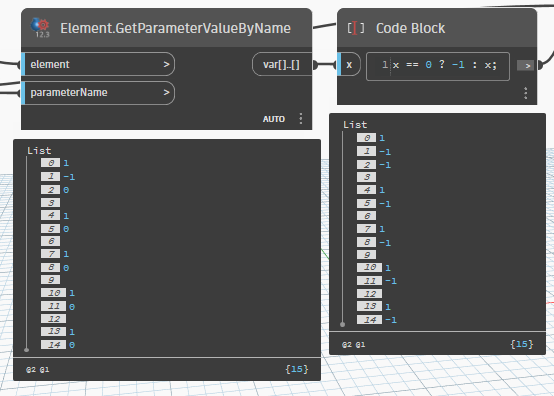
The only issue I’m having is that booleans that have never been set are coming back empty. The second wall was set to 0 and then reset via the script - it correctly shows the -1 (null) value.
Updating the conditional to check for
0 or
"" correctly handles both cases.
Can you show us what happens when you do this for the example file using the Check parameter?
@Nick_Boyts ,
it works with codeblock too. i restarted Revit.