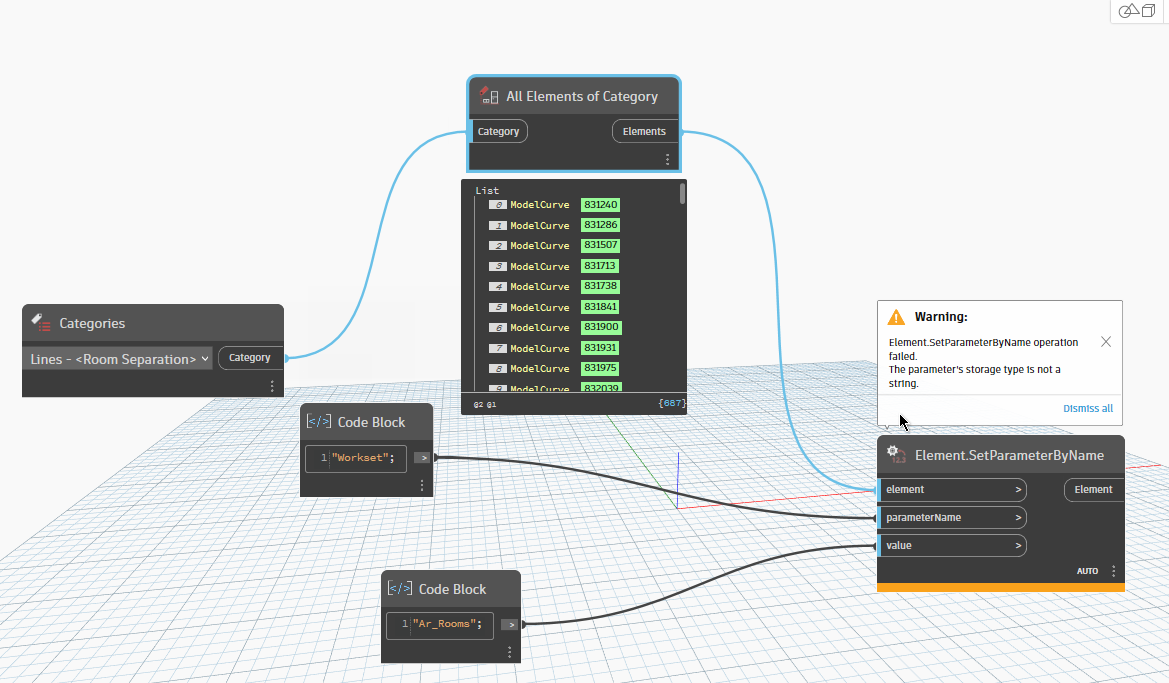
Hi All,
I’m trying to get into dynamo and trying to make a basic script to reassign certain elements to a certain workset etc but I keep getting this error. I’ve checked with all typos and everything so I’m not sure how to proceed with this, any suggestions?
I also tried removing the apostrophes, it still doesn’t work, from my understanding, value for workset is a text type, so it doesn’t make sense why this is happening.
You need to understand the storage of parameters as they can be anything from ElementId, String, Double, etc. So you need to know what the parameter requires to be able to set it.
I think you need to get the workset element or the integer of the element id then put that in as the value
workset is controlled by workset id, try something here…and welcome to the forum 
test workset.dyn (15.6 KB)
Do I understand correctly that in revit, the workset value for most elements is text which would translate to string in dynamo? That’s how I based this script. Please correct me if I am wrong, I am new to dynamo but I can get around with revit.
Thank you Sovitek, let me try this and get back to you!
yeah give it a take and see if it could work for you
There’s a difference between what the Revit database and API are doing and what the UI is showing.
Worksets are elements. Assigning a workset to an element is assigning that workset object (an element) to the instance (also an element). The UI shows that workset object as the name since you can’t “visualize” a workset and the element ID wouldn’t be very helpful. Many parameters representing settings or connected objects are actually elements. There’s not much you can do with a name, but an element has its own parameters and properties that can be shared or controlled through a hierarchical relationship.
Its still a new concept to me, so a little confusing but I think I get it. Till yesterday I assumed worksets as simply a property of the object, so this is new.
Thank you for helping me understand. Appreciate it.