Hello,
I made a script that will read properties from an excel spreadsheet and then write them to the part.
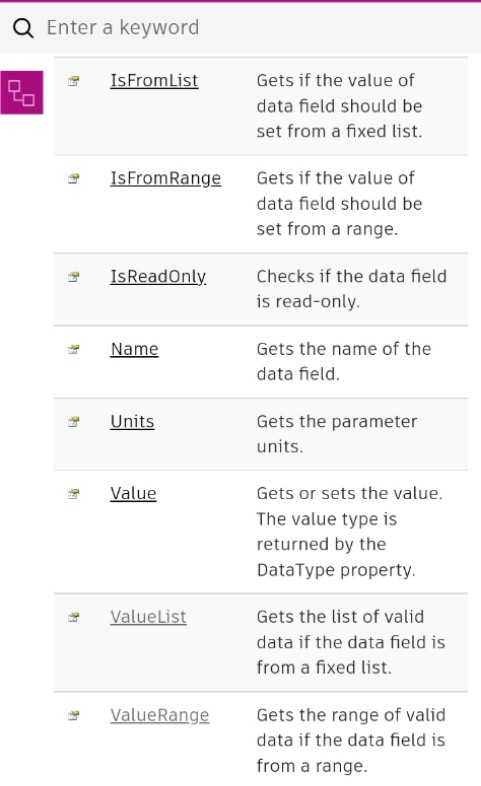
The problem I’m having is with the PartDataRecord. I am able to get the PartDataField’s ValueList and its items on the first run of a fresh network, change the property and then apply it to the pipe. But when I save and close everything down, then reopen the same network and run the same script, the PartDataField.ValueList returns an error:
“System.InvalidOperationException: It’s not from a fixed list. at Autodesk.Civil.DatabaseServices.PartDataField.get_ValueList()”
Am I applying the PartData the wrong way? I got the method of pipeObj.PartData = pipePartDataRecord from here.
Thank you.
Edit: I recognize I can do this through the Civil 3D Toolkits PartData nodes, I’m just trying to grow some skills via python and the API.
Code:
# Load the Python Standard and DesignScript Libraries
import sys
import clr

# Add Assemblies for AutoCAD and Civil3D
clr.AddReference('AcMgd')
clr.AddReference('AcCoreMgd')
clr.AddReference('AcDbMgd')
clr.AddReference('AecBaseMgd')
clr.AddReference('AecPropDataMgd')
clr.AddReference('AeccDbMgd')

# Import references from AutoCAD
from Autodesk.AutoCAD.Runtime import *
from Autodesk.AutoCAD.ApplicationServices import *
from Autodesk.AutoCAD.EditorInput import *
from Autodesk.AutoCAD.DatabaseServices import *
from Autodesk.AutoCAD.Geometry import *

# Import references from Civil3D
from Autodesk.Civil.ApplicationServices import *
from Autodesk.Civil.DatabaseServices import *

# The inputs to this node will be stored as a list in the IN variables.
cadPipe = IN[0]
errorReport = None
results = []

adoc = Application.DocumentManager.MdiActiveDocument
cdoc = CivilApplication.ActiveDocument
editor = adoc.Editor

with adoc.LockDocument():
    with adoc.Database as db:
        with db.TransactionManager.StartTransaction() as t:
            try:

                pipeObj = t.GetObject(cadPipe.InternalObjectId, OpenMode.ForWrite)

                pipePartDataRecord = pipeObj.PartData
                pipeBedClsFld = pipePartDataRecord.GetDataFieldBy("PBC")

                results = pipeBedClsFld.ValueList[0]

                # Commented out for testing. Change pipe's Bedding Class
                #pipeBedClsFld.Value = pipeBedClsFld.ValueList[3]
                #pipeObj.PartData = pipePartDataRecord

            except:
                import traceback
                errorReport = traceback.format_exc()
            t.Commit()
# Assign your output to the OUT variable.
if errorReport == None:
    OUT = results
else:
    OUT = errorReport