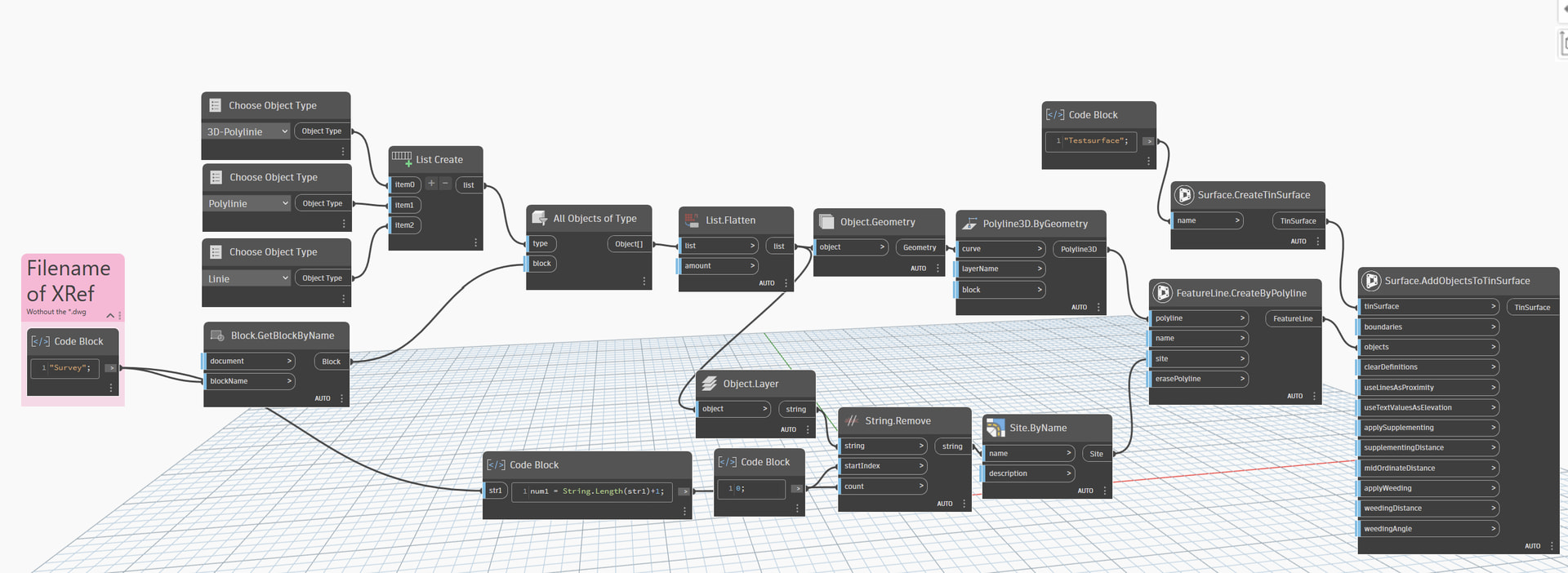
I am after some help in creating a script that I can use to essentially follow the method I currently use to create an existing ground model without the manual clicks in between. Basically open a file, run dynamo and a new file is created in the way I have specified with an existing ground model.
My Method:
I make my existing ground models in a specific way, I copy the the linework generated from the surveyor into a new file (based on company template) and convert those into feature lines placed in entity specific sites. For example if the layer is “Kerb Channel” then all the linework on that layer will be selected, copied to the new drawing and converted to a featureline; where it is placed in a site called “Channel”. I will repeat this process for top of kerbs, changes of material etc. Then each of those sites in tern are all added to a surface (the existing ground model) as breaklines. I then run a simple dynamo script to collect all the single points in the drawing (avoiding duplication with the linework), copy those points into the new drawing, convert them to cogo points and add them to the surface in a point group.
My Idea:
I want to be able to automate the above, I assume I would need to build some kind of database of the topo files we usually receive (this can be amended as needed for a new supplier or remove old ones). Dynamo would then read that database and work out based on the file who produced the topo, then based on that follow the correct selection of entities based on the layering set up in the database.
Is this possible? Or even worth it? Is it likely it will just crash trying to read so much info?
I have a feeling I would need to use dictionaries and keys but I cant really seem to get my head around how to build the script; let alone in an efficiant manner!
Well, we are not able to create it for you but we will be here to help you move forward within your Dynamo journey. What have you done this far? Please share your current work and the we can help you
Please upload .dyn-file, screenshots or similar
Apologies I hit return before finishing the query.
So far - the idea, open and close dynamo a few times and read through a number of posts about dictionaries and selections.
I dont really know where to start - My first thought was just to make an excel of different topo layers; but then I was questioning of even if i need to do that; is there a more efficient way i.e. I just manually tell it who produced the survey and connect the relevant node.
The point cleanup dyn is very simple but i would like to integrate it into the process.
I dont really know how to cross check an open drawing’s layers to the lists created. I basically have something that I dont really know what to do with.
What I want to do is it get the layers from the topo survey CAD file (which looks easy enough) and then compare the drawing layers to the layers in the spreadsheet; this will then allow me to build a “process” to run depending on who the survey is from. (The process which I also don’t know how to build in dynamo)
Your version will be an issue sooner than you think. 2024 is into the last year and 4 months of it’s likely lifespan. And 2025 introduces a LOT of breaking changes around 3rd party packages. If you can update now to 2025 (or 2026) you’ll be better off in the long term.
Business’ information isn’t a thing to worry about. You don’t need to provide the real file, but a dwg containing faked data that is similar in nature and content to what you typically have. Start a new file from a blank or Autodesk supplied template, draw something that mirrors the types of objects you have, and set properties / property sets accordingly. Be sure to have at least 3 of every object type to ensure that lists of objects are processing well.
Instead of XLSX consider using a CSV. Just as good for data management, more secure, opens and saves in Excel just fine so data entry won’t be any than it is now, and you’ll get better performance in Dynamo plus more stability over time (the node you’re using will be removed in a future build of Dynamo).
Instead of jumping into building stuff, I recommend you start with the Dynamo primer, as many of your questions will be answered there. Read everything and do every exercise in the sections Introduction to Custom Nodes and Packages, bypass Dynamo for Revit and pick up again with Dynamo for Civil 3D. Skip nothing, even if it doesn’t seem relevant to your goal - the primer is structured to teach you what you need to know in order to use Dynamo, not to build a specific automation.
After the primer is done, write down every step you have to take (similar to what you did here but less specific around the method). Then break down the steps into action sequences (i.e. read the CSV of layer mappings; get the objects from the other drawing; copy the objects to the new drawing; convert the object to a feature line; etc.;). You can’t be too detailed for the later, but you can be too detailed in the former.
After your mapping is done, focus on building Dynamo graphs to solve actions. You don’t need to land them all yet, but small victories are good. Reading the Excel data is a good example of this.
If you get stuck building a graph for an action, post the graph you’ve tried to build and the dataset to use on it here so others can provide guidance.
I can offer some additional things:
Adding breaklines to a surface without reverting to code was only made possible recently by a package called the “The Civil Nodes”. The node you need is only available from Civil3d 2026.1 onwards, so if this step is really important to you, I think that you’ll have to update your Civil3d (there are many additional benefits as well, so go for it!).
I’ve attached an example script that’s more or less a mockup of what I think you want to do (without the layer mapping). I’m not that well versed in Dynamo so there might be much smarter and more efficient ways but maybe it’s a starting point (it only works with Civil3d 2026.1 and with “The Civil Nodes” though).
The script assumes that you have the file of the surveyor attached as an XRef in your drawing (I’ve created a testfile with a bunch of layers called “Survey.dwg”). Once a file is XRefd, Autocad treats it as a block and it’s easy to obtain the geometry. (There might be a way to specify the filepath to the survey-file but I don’t know how that would be done)
Afterwards, all 3dpolylines, polylines and lines of the xref are processed and converted to featurelines. The script checks the layers the geometry is on and creates corresponding sites for the featurelines. In the end, all featureslines are added to a surface.
So to run this, you have to open a new file, xref “Survey.dwg”, open Dynamo and hit run.
I really do wish it was as simple as you have noted; I wont bore you with excuses and reasons but if to do what I want is only available by updating the idea is dead in the water.
Why don’t you just build the surface by selecting all the linework? Civil 3d accepts the following objects as Breaklines: lines, feature lines, 2D/3D polylines & splines.
Correct; you can - Not sure on the spline part though. An alternative could also be extracting the vertices of all the geometry in the drawing, create point groups and make the surface just from the point groups; there would however be disadvantages to that; like other methods of surface creation.
I wanted a time saving of the manual processing part of the method I outlined - something dynamo can likely do.
You can still get much of this with Dynamo as noted above, even with the blocker around 2024.1. While a single button might not be viable, if you save 60% of the time with a three step solution instead of a 80% of the time with a single step solution you’re still saving 60% of that time. Requiring immediate perfection be the enemy of progress.
I acknowledge this - the points cleanup dyn I put a picture of above saves me hours in some of the surveys I work with - running before I walk might be more accurate.
Perhaps I shouldn’t be so defeatist; Maybe I misunderstand that only part of the nodes used require 2026.
So I can get the sites to creates based on the layers form the xref - Small win 1; thank you @pumpaij I basically copied your dyn.
I can also get the geometry to copy through from the xref and convert to a featureline; small win 2; what I am struggling with now is getting the featurelines to be placed in the correct site based on the layer they were in the xref. i.e. lines on layer “channels” go into the site called “channels” etc.
I know it is possible to read the layer and create the object, what I am strugging with is matching the new object created to its Original layer.
This sort of works. However only seem to match the layer to polyline/3D polylines that have the same elevation along its length - everything else is on layer 0 - frustrating!
Lines also seem to be proving a problem to create the CAD geometry with; it shows it in the Dynamo viewer but does not create the line when put back into CAD. Any help please?
I almost have what I want - taken a while to get there but there is one thing which is causing a bit of an issue.
On some of the larger area worksets the 3d polyline which is being converted into a featureline is losing its accuracy; for example a closed 3D polyline with 4 vertices is becoming a featureline with 3 points - it is removing one of the vertices.
It looked originally like there were some coincident points and so I have tied to clean those up using the 3dpolyline prune node in i think it is the camber toolkit but this still happens.
I then took two of the 3D polylines converting incorrectly and played around and found that the geometry scaling was causing the issue. When the scaling was set to small they converted fine, but any higher and they would begin missing vertices.
Due to the size of some of the worksets (as in the overall extents can be quite large) when the script is run I get the info pop up to tell me to change the scaling to a larger set - most commonly to the “large” set - but if i do this then i lose the accuracy of the featurelines.
My question therefore is is there a way around this? Do i have to break down every 3D polyline to its vertices then re create it (I feel like this would be insanely inefficient) and then how would I then place the re created line back onto the layer it came from and in the correct site (I have a feeling it is item at index etc - but this is something i struggle with).
I came across this issue as well when I was trying to make a script to generate a zero elevation polyline from a featureline. You could try the attached, it does use each vertex as you say. I’m not sure about efficiency as it was only for one featureline at a time.
You would need to change the xy point by coordinates to the xyz one :