I create the list LISTSOM
made up of 5 identical sublists

With for loops I search
where each sublist contains:

<EPItem ID="">

must transform them into

<EPItem ID="1">
<EPItem ID="2">
<EPItem ID="3">
<EPItem ID="4">
<EPItem ID="5">

It only takes
<EPItem ID="1">
for all sublists

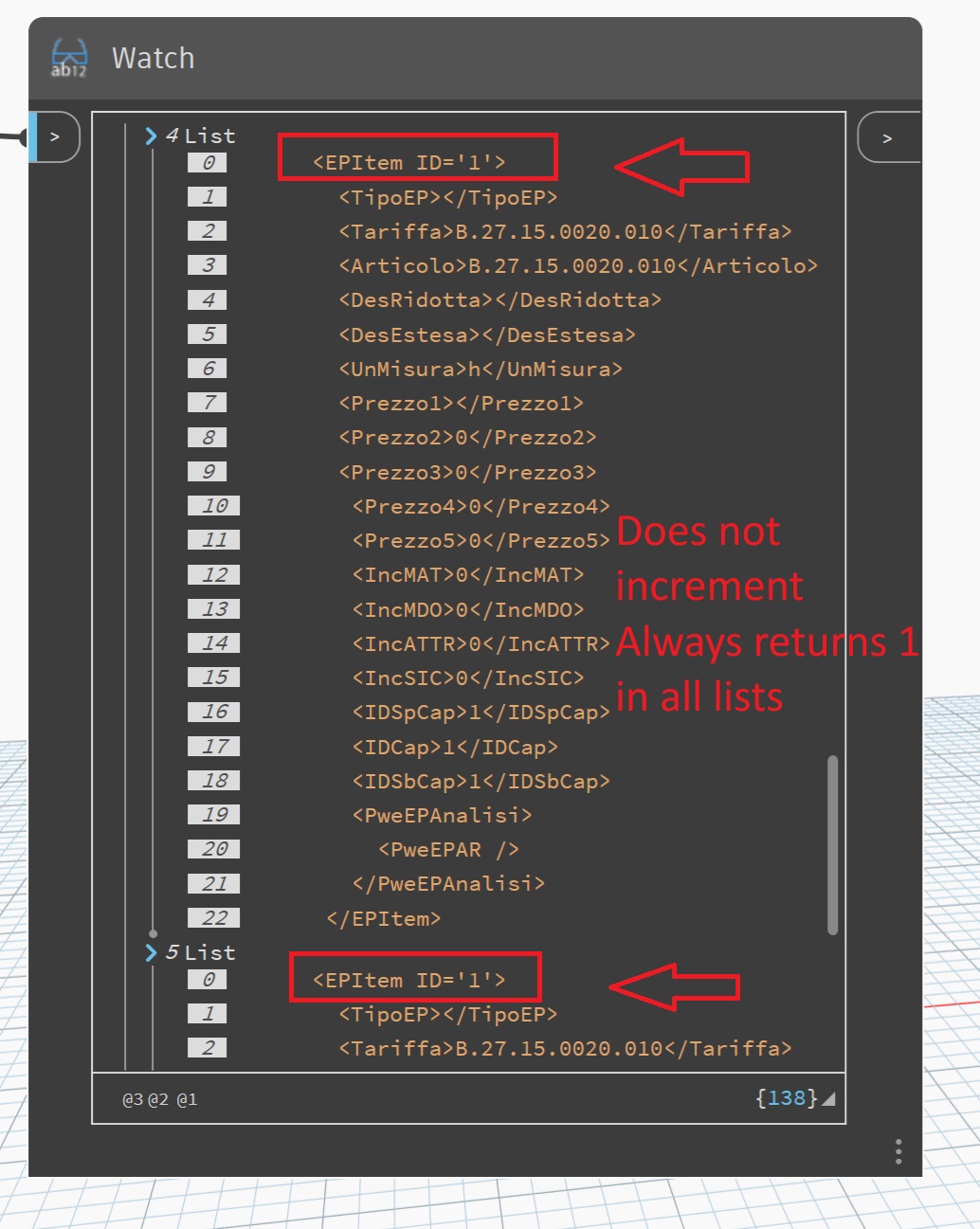
It doesn't increment
num=num+1

I don't understand... it only takes 1

See attached images

Help?
Thanks

You send only an part. An guess what are the value off LISTSOM, lun2 and lun3?
This seems odd behaviour - you are incrementing the number so it should be changing
Your code could be cleaner if you utilised some of the built in functions of python like enumerate and ‘f’ [format] strings
You can also escape double quotes with a backslash \" in Dynamoscript and Python to maintain a string’s exact formatting
The enumerate function is really handy as it returns a tuple of a number and an item
You could also use str.replace() method
i.e data[i][j] = data[i][j].replace("\"\"", f"\"{n}\"")

Original code
data = IN[0]

len1 = len(data)
len2 = len(data[0])

num = 0
numbers = []
str1 = "      <EPItem ID=\""
str2 = "\">"
str_tot = '      <EPItem ID="">'

for i in range(len1):
    num = num + 1
    num_str = str(num)
    for j in range(len2):
        if data[i][j] == str_tot:
            data[i][j] = str1 + num_str + str2
            numbers.append(num)

OUT = data
Alternative code
data = IN[0]

data_copy = data.copy()

# modify copy while iterating over original
for i, u in enumerate(data):
    for j, v in enumerate(u):
        if "EPItem ID" in v:  # this will catch single and double quotes
            data_copy[i][j] = f"      <EPItem ID=\"{i+1}\">"
            break   # No need to go further

OUT = data_copy
One liner with nested list comprehensions
OUT = [
    [f'      <EPItem ID="{n}">' if "EPItem ID" in j else j for j in i]
    for n, i in enumerate(IN[0], 1)
]


I’m not sure of your use case or the xml schema you are using, I made the assumption there would only be one per list otherwise remove the break. Do you want it to reset for each list?
data = IN[0]

data_copy = data.copy()

count = 0
for i, u in enumerate(data):
    for j, v in enumerate(u):
        if "EPItem ID" in v:
            count += 1
            data_copy[i][j] = f"      <EPItem ID=\"{count}\">"

OUT = data_copy
Thanks for the reply,
but it doesn't work.
It always returns:
<EPItem ID="6">
in all sublists.
It doesn't increment.
I haven’t worked through your code in detail- but I’d guess it might be to do with the quote characters
EPItem ID="1"
is different from
EPItem ID='1'
is different from
EPItem ID=‘1’
I think you’re overcomplicating the issue. If your sublists are all the same and you just want to inject an incremented value, you can just write that value directly by replacing the index.
myList = IN[0] #original list
n = 1 #starting value to increment

for sub in myList: #for each sublist
    sub[0] = "<EPItem ID='" + str(n) + "'" #replace the first index with the incremental value
    n = n+1 #increment

OUT = myList #return updated list


Your original post specifically asks about a list of sublists. Why are you flattening the list now? Can that be done after the transform?
Yes, that's true... I didn't flatten the list.
I also have the case where the list consists of a single index... for simplicity, I flattened the one in the example... but the replacement will be on a single-element list... but I don't understand why it doesn't work...
It becomes less clear what you’re looking for when you start introducing multiple cases and potentially different list structures. Typically, any function is going to expect a defined structure. If you don’t know the structure (or you expect varying structures) you have explicitly handle those scenarios. We can modify the code to handle a single list or multiple sublists, but it’s much more beneficial, more stable, and usually easier, to ensure that you have a single structure that you can develop for.
So, again, the question becomes why are you changing from sublists to a single list? If your graph returns sublists but you need the output as a single list then we can just flatten after the fact. If your graph sometimes returns sublists and sometimes returns a single list I’d like to see why - this usually isn’t the case, and if it is, we can usually fix it.
We can still handle both cases by specifically building a check for structure and then handling either condition separately. We can use a singular function for both conditions, but we do have to treat those conditions as two separate possibilities. That means we now have 1) to develop a function for the single list condition (because that’s the most restrictive condition) and 2) include branches in our code that will handle whether we execute that function once for a single list or multiple times within a loop for a list of lists.
myList = IN[0]
searchTerm = "<EPItem ID=''>" #value you want to replace
n = 1 #starting increment

def ReplaceItemID(sublist,n): #checks each item in sublist and replaces term matches with the next incremental value
    for i,item in enumerate(sublist): #enumerate so we have the value and the index
        if item == searchTerm: #look for matches
            newID = "'"+str(n)+"'" #create our new incremental ID
            newTerm = searchTerm.replace("''",newID) #replace the original blank value with the new ID
            sublist[i] = newTerm #replace the item at the matching index with the new value
            n = n+1 #increment
    return sublist

isSublist = isinstance(myList[0], list) #checks to see if the list contains sublists

if isSublist: #if sublists, search each sublist and replace
    for sub in myList:
        ReplaceItemID(sub,n)
        n = n+1
else: #if no sublists, replace in initial list
    ReplaceItemID(myList,n)

OUT = myList #return the updated list


Correct. This is what I was trying to explain in the other thread. You’re building your list with variables (quarta) and then you’re changing those variables (sub = quarta). Python remembers that the list is made of the same variable, so when you change it the whole list updates. This is known as a mutable object. Mutable and immutable objects essential mean objects with types that copy or share references (mutable) or ones that create their own reference (immutable).
If you have a defined variable
a = [1]
and then create a list using that variable
myList = [a,a,a,a]
the list will return that variable as a value.
myList = [[1],[1],[1],[1]]
If that variable is mutable (like a list) and then you change it
a[0] = 2
the list still knows that it’s made up of the mutable variable
myList = [a,a,a,a]
and therefore returns the new value.
myList = [[2],[2],[2],[2]]
This is what you’re doing when you replace the index in the same python instance. A new instance wouldn’t have the original mapping of variables and would just be a simple list. You can get around this by rebuilding the whole list (rather than overwriting the current variable) or by simply copying the original variable to remove the shared reference.
Examples: Setting b = a keeps the same reference and essentially means they are the same object. Updating b also updates a. Setting b equal to a copy of a removes any shared references and treats them as separate objects. Updating b no longer updates a.

Rather than setting myList = quart you can copy the values using myList = copy.copy(quart) to keep them separate.
Thanks for the very clear answer