Hello Dynamo Community,
I am looking for a Dynamo script or .dyn file that can help me find duplicate tags in a Revit floor plan view. I want to identify tags that are placed on the same element and in the same location (for example, overlapping Room Tags or Door Tags).
I am new to Dynamo, so a simple solution or a sample file would be very helpful. If you have a script or workflow that works for this, could you please share it? Any step-by-step instructions or screenshots would also be appreciated.
Thank you!
Hello, and welcome.
I’d recommend you give Primer a look, if you have something you need to understand the “how’s” in Dynamo.
Broadly speaking, what you need is to identify the tags in the view(s), see to which element they are attached, organize your list so you can check if there are 2 instances tagging the same element, then separate the ones that are duplicates and delete.
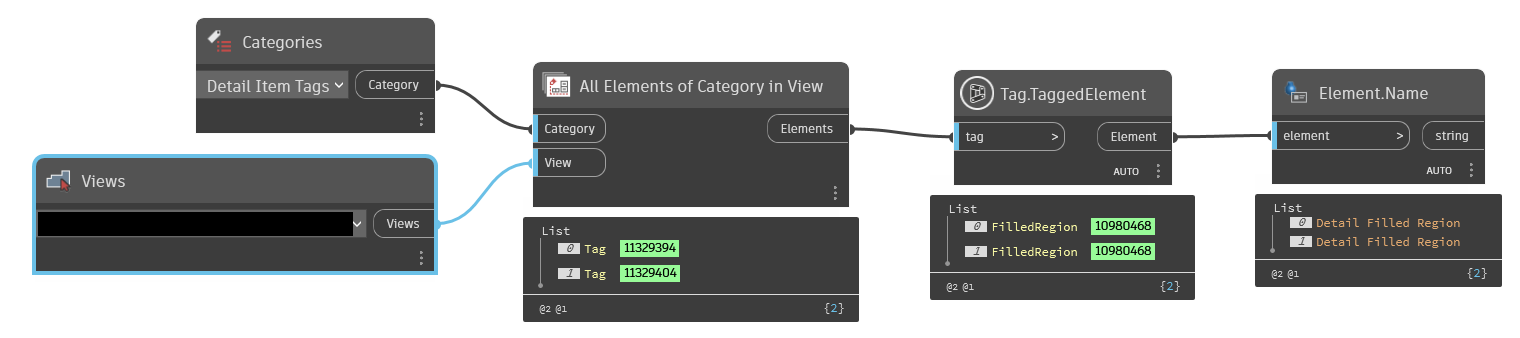
Here’s a quick example of one way to start your graph:
(disregard the Element.Name node, it’s only for context)
Do you see that the “Tag.TaggedElement” ID Values are the same? That means those 2 Tags are placed on the same object. You would need to isolate one of them, and delete the rest (in this case just 1, but there could be more than that). Once you have that sorted out, you can scale your graph to deal with multiple inputs, list levels and even multiple categories.
Get on it and if you get stuck, the forum is always here. Cheers.