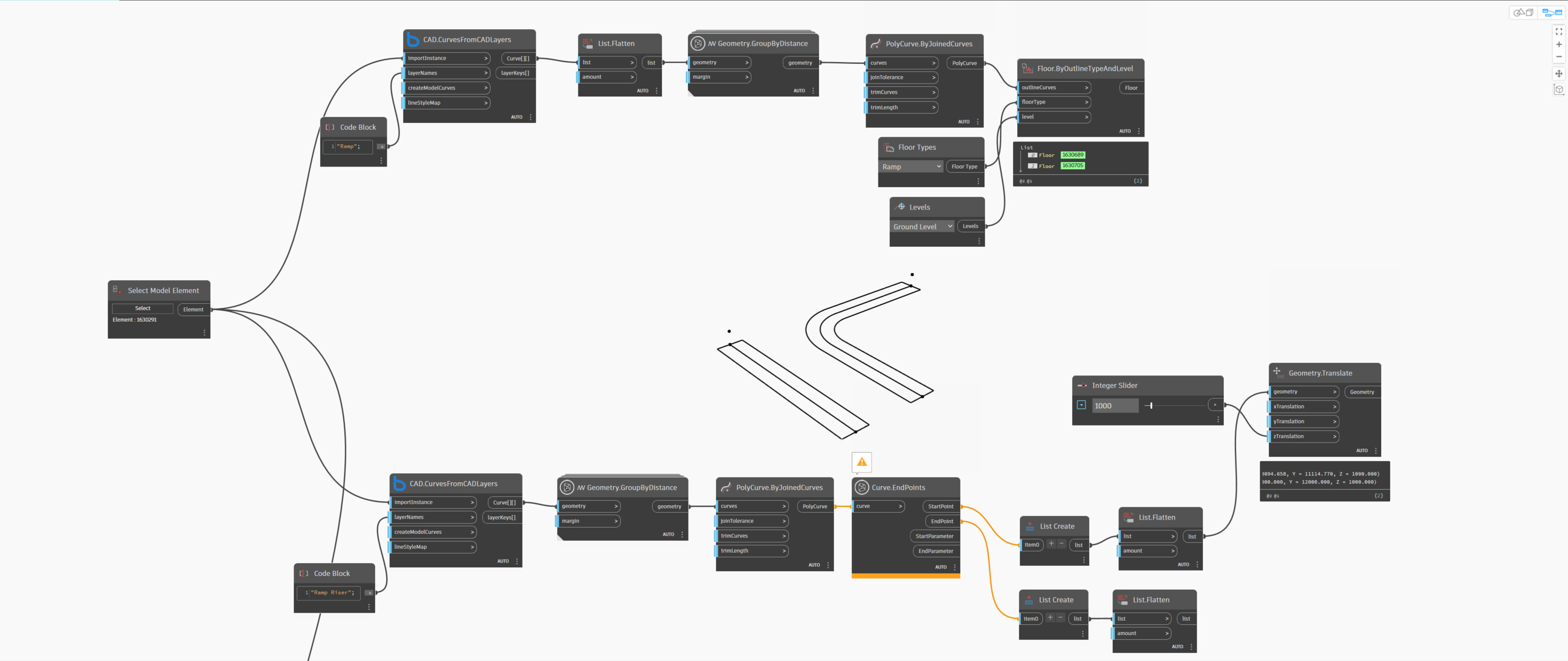
In this script, I am trying to create a ramp by generating a floor from a linked CAD file in Revit. I have already created the floor, and in a separate CAD layer I drew a ramp riser line. From this riser, I extracted the end points and adjusted the Z level for the higher end. The challenge I am facing now is how to connect the end of the floor to this modified end point with the new Z elevation.
What I am really trying to achieve is the creation of ramps in Revit directly from linked CAD.
Not to be contrarian, but at that point why not just draw the ramp in Revit?
I’ve got several projects, and I’m trying to create the main parts in an easier and faster way. I just want to try this approach first, if it works, it’ll really help me; if not, I’ll just go back to the traditional way of drawing the ramp in Revit.
Ok - then why not create the ramp as a ramp instead of a floor?
The issue with using a floor is that each point on the sketch has to be adjusted to the correct height or you will get bad results. Just adjusting the end only will cause shape edit issues in the curved L as one example.
really, I want to create ramp but i didn’t find any node for ramps.
if you have any package or suggestions please let me know.
thanks for your help
I’m trying to extract the center line of a ramp, get its start and end points, translate the end point upward along the Z-axis, then construct a vector from the start point to this new translated end point. I then use this vector to translate a geometry (e.g. a floor), starting from the main level. However, the translation doesn’t seem to work, and I’m not sure why.
I don’t know of any nodes for it, but I am fairly certain there is an API for it so worth looking into building a Python solution.