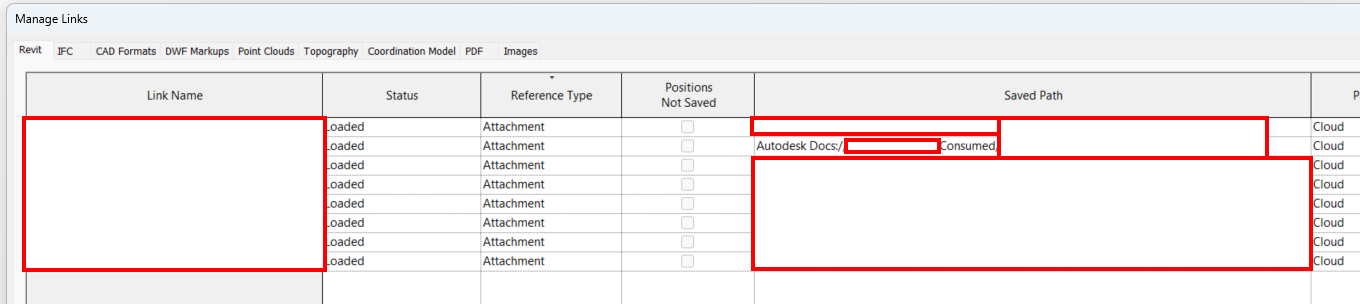
I’m trying to close the worksets of linked models hosted on ACC using the Genius Loci node.
The node returns null but I believe my inputs are correct.

I opened the node to try the python script and got the following error.
What does line 41 and the code reading up to it look like? Note that list strucures may need reworking to make things work in the workspace environment vs the custom node environment.
Hi,
here a workaround (python)
code Updated
import clr
import sys
import System
#import Revit API
clr.AddReference('RevitAPI')
import Autodesk
from Autodesk.Revit.DB import *

#import net library
clr.AddReference('System')
from System.Collections.Generic import List

clr.AddReference('RevitServices')
import RevitServices
from RevitServices.Persistence import DocumentManager
from RevitServices.Transactions import TransactionManager
doc = DocumentManager.Instance.CurrentDBDocument
uiapp = DocumentManager.Instance.CurrentUIApplication
app = uiapp.Application

def manage_link_Worksets(rvt_lnk_inst, lst_wksetName_to_open):
    """
    open only the specified worksets in a linked Revit model,
    and reload the link using that configuration.

    Parameters
    ----------
    rvt_link_instance : Autodesk.Revit.DB.RevitLinkInstance
    workset_names_to_open : list of str
        Names of the worksets in the linked document that should remain open; all others will be closed.

    Returns
    -------
    Autodesk.Revit.DB.RevitLinkInstance
    """
    TransactionManager.Instance.ForceCloseTransaction()
    rvtRvtlinkType = doc.GetElement(rvt_lnk_inst.GetTypeId())
    linkdoc = rvt_lnk_inst.GetLinkDocument()
    worksetTable = linkdoc.GetWorksetTable()
    mpath = linkdoc.GetWorksharingCentralModelPath()
    lstPreview =  WorksharingUtils.GetUserWorksetInfo(mpath)
    worksetId_to_open = [worksetTable.GetWorkset(x.Id).Id for x in lstPreview if x.Name in lst_wksetName_to_open]
    #
    wkstConfig = WorksetConfiguration(WorksetConfigurationOption.CloseAllWorksets)
    lstWksetId = List[WorksetId](worksetId_to_open)
    wkstConfig.Open(lstWksetId)
    load_result = rvtRvtlinkType.LoadFrom(mpath, wkstConfig)
    return rvt_lnk_inst

toList = lambda x : x if isinstance(x, list) and not isinstance(x, (str, System.String)) else [x]

lst_rvtLinkInstance= toList(UnwrapElement(IN[0]))
lst_wksetName_to_open = IN[1]

OUT = [manage_link_Worksets(lnk_inst, lst_wksetName_to_open) for lnk_inst in lst_rvtLinkInstance]
import clr
# Import DocumentManager and TransactionManager
clr.AddReference("RevitServices")
import RevitServices
from RevitServices.Persistence import DocumentManager
from RevitServices.Transactions import TransactionManager
# Import RevitAPI
clr.AddReference("RevitAPI")
import Autodesk
from Autodesk.Revit.DB import *

docu = DocumentManager.Instance.CurrentDBDocument

def tolist(obj1):
    if hasattr(obj1,"__iter__"): return obj1
    else: return [obj1]

linkInstance = tolist(UnwrapElement(IN[0]))
worksetNames = tolist(IN[1])

doc = linkInstance[0].GetLinkDocument()

closedWks,openWks = [],[]

#Collect worksets
userWorksets = FilteredWorksetCollector(doc).OfKind(WorksetKind.UserWorkset).ToWorksets()
for userWks in userWorksets:
	wName=userWks.Name
	for wksName in worksetNames :
		if wksName.lower() in wName.lower() :
			closedWks.append(wName)
	if wName not in closedWks :
		openWks.append(userWks.Id)

#WorksetConfig=WorksetConfiguration()
WorksetConfig=WorksetConfiguration(WorksetConfigurationOption.CloseAllWorksets)
WorksetConfig.Open(openWks)

TransactionManager.Instance.ForceCloseTransaction()
RevitLinkType = docu.GetElement(linkInstance[0].GetTypeId())
filepath = RevitLinkType.GetExternalFileReference().GetAbsolutePath()
RevitLinkType.LoadFrom(filepath,WorksetConfig)

OUT = RevitLinkType,closedWks
I updated the code in my previous post for a list at input
try this version 
import clr
import sys
import System
#import Revit API
clr.AddReference('RevitAPI')
import Autodesk
from Autodesk.Revit.DB import *

#import net library
clr.AddReference('System')
from System.Collections.Generic import List

clr.AddReference('RevitServices')
import RevitServices
from RevitServices.Persistence import DocumentManager
from RevitServices.Transactions import TransactionManager
doc = DocumentManager.Instance.CurrentDBDocument
uiapp = DocumentManager.Instance.CurrentUIApplication
app = uiapp.Application

def manage_link_Worksets(rvt_lnk_inst, lst_wksetName_to_open):
    """
    version : v0.2
    open only the specified worksets in a linked Revit model,
    and reload the link using that configuration.

    Parameters
    ----------
    rvt_link_instance : Autodesk.Revit.DB.RevitLinkInstance
    workset_names_to_open : list of str
        Names of the worksets in the linked document that should remain open; all others will be closed.

    Returns
    -------
    Autodesk.Revit.DB.RevitLinkInstance
    """
    TransactionManager.Instance.ForceCloseTransaction()
    rvtRvtlinkType = doc.GetElement(rvt_lnk_inst.GetTypeId())
    linkdoc = rvt_lnk_inst.GetLinkDocument()
    worksetTable = linkdoc.GetWorksetTable()
    mpath = linkdoc.GetWorksharingCentralModelPath()
    userWorksets = FilteredWorksetCollector(linkdoc).OfKind(WorksetKind.UserWorkset).ToWorksets()
    worksetId_to_open = [wkset.Id for wkset in userWorksets if wkset.Name in lst_wksetName_to_open]
    #
    wkstConfig = WorksetConfiguration(WorksetConfigurationOption.CloseAllWorksets)
    lstWksetId = List[WorksetId](worksetId_to_open)
    wkstConfig.Open(lstWksetId)
    load_result = rvtRvtlinkType.LoadFrom(mpath, wkstConfig)
    return rvt_lnk_inst

toList = lambda x : x if isinstance(x, list) and not isinstance(x, (str, System.String)) else [x]

lst_rvtLinkInstance= toList(UnwrapElement(IN[0]))
lst_wksetName_to_open = toList(IN[1])

OUT = [manage_link_Worksets(lnk_inst, lst_wksetName_to_open) for lnk_inst in lst_rvtLinkInstance]
unfortunately I don’t have an ACC project with a configuration similar to yours in terms of access rights.
do you use packages for your linked models, or have you directly linked the central cloud models of other professions ?
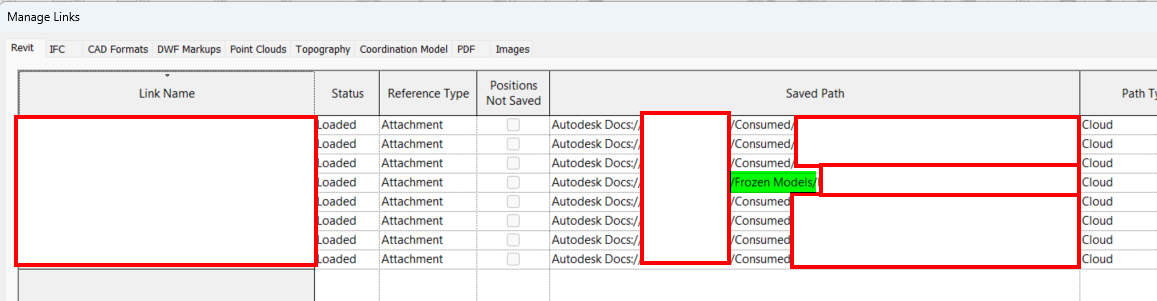
All the models are consumed, then linked in from the consumed folder.
I will try the script on a model that I collaborated to ACC to see if there’s a difference.
It works for a model that I collaborated (highlighted in green), but doesn’t for the models that were consumed.
I don’t know why the models would behave like this since the edit permission is be the same across the folder on ACC. I can double check that there’s not different permissions by default on the consumed folder, but it should inherit the parent folder permissions.
Likely the path is inconsistent for the model types. What are you seeing for those values?
Hi @RDM
can you try this version ?
import clr
import sys
import System
#import Revit API
clr.AddReference('RevitAPI')
import Autodesk
from Autodesk.Revit.DB import *

#import net library
clr.AddReference('System')
from System.Collections.Generic import List

clr.AddReference('RevitServices')
import RevitServices
from RevitServices.Persistence import DocumentManager
from RevitServices.Transactions import TransactionManager
doc = DocumentManager.Instance.CurrentDBDocument
uiapp = DocumentManager.Instance.CurrentUIApplication
app = uiapp.Application

def manage_link_Worksets(rvt_lnk_inst, lst_wksetName_to_open):
    """
    version : v0.3
    open only the specified worksets in a linked Revit model,
    and reload the link using that configuration.

    Parameters
    ----------
    rvt_link_instance : Autodesk.Revit.DB.RevitLinkInstance
    workset_names_to_open : list of str
        Names of the worksets in the linked document that should remain open; all others will be closed.

    Returns
    -------
    Autodesk.Revit.DB.RevitLinkInstance
    """
    TransactionManager.Instance.ForceCloseTransaction()
    rvtRvtlinkType = doc.GetElement(rvt_lnk_inst.GetTypeId())
    dict_extRef = rvtRvtlinkType.GetExternalResourceReferences()
    externalResourceReference = None
    for item in dict_extRef:
        externalResourceType = item.Key
        externalResourceReference = item.Value
        print(externalResourceReference.InSessionPath )
        break
    if externalResourceReference is not None:
        linkdoc = rvt_lnk_inst.GetLinkDocument()
        userWorksets = FilteredWorksetCollector(linkdoc).OfKind(WorksetKind.UserWorkset).ToWorksets()
        worksetId_to_open = [wkset.Id for wkset in userWorksets if wkset.Name in lst_wksetName_to_open]
        #
        wkstConfig = WorksetConfiguration(WorksetConfigurationOption.CloseAllWorksets)
        lstWksetId = List[WorksetId](worksetId_to_open)
        wkstConfig.Open(lstWksetId)
        load_result = rvtRvtlinkType.LoadFrom(externalResourceReference, wkstConfig)
    return rvt_lnk_inst

toList = lambda x : x if isinstance(x, list) and not isinstance(x, (str, System.String)) else [x]

lst_rvtLinkInstance= toList(UnwrapElement(IN[0]))
lst_wksetName_to_open = toList(IN[1])

OUT = [manage_link_Worksets(lnk_inst, lst_wksetName_to_open) for lnk_inst in lst_rvtLinkInstance]
Nice, this worked perfectly.
It does give you a popup warning if the script is run on a model that already has closed worksets but that’s fine.
While I can set up an index slider and run it model by model, is there an easy way to for this to work on multiple models?
Bird tools has an app called Dynamo multi player which will do the trick.
Sorry I was meaning multiple instances of linked models in the same file, Multiplayer will work for running this process on multiple Revit files.
You’ll have to set up a loop, or create a custom node.
The former can be done via basic edits to the last four lines of the Python code above and is a great learning experience so give it a shot.
The later is easier still, and instructions CSM be found on the Dynamo primer.
I took the opportunity to update an old article on my blog
# Python Script  | Main
import clr
import sys
import System
from System.Collections.Generic import List

clr.AddReference("System.Core")
clr.ImportExtensions(System.Linq)

clr.AddReference('RevitAPI')
import Autodesk.Revit.DB as DB
from Autodesk.Revit.DB import *

clr.AddReference('RevitServices')
import RevitServices
from RevitServices.Persistence import DocumentManager
from RevitServices.Transactions import TransactionManager

#Get Important vars
doc = DocumentManager.Instance.CurrentDBDocument
uiapp = DocumentManager.Instance.CurrentUIApplication
app = uiapp.Application

clr.AddReference('System.Data')
from System.Data import *

clr.AddReference("System.Xml")
clr.AddReference("PresentationFramework")
clr.AddReference("System.Xml")
clr.AddReference("PresentationCore")
clr.AddReference("System.Windows")
import System.Windows.Controls
from System.Windows.Controls import *
import System.Windows.Controls.Primitives
from System.IO import StringReader
from System.Xml import XmlReader
from System.Windows import LogicalTreeHelper
from System.Windows.Markup import XamlReader, XamlWriter
from System.Windows import Window, Application
from System.Windows.Data import IValueConverter

import time
import traceback

class MainWindow(Window):
    __slot__ = "Window"
    string_xaml = '''
    <Window
            xmlns="http://schemas.microsoft.com/winfx/2006/xaml/presentation"
            xmlns:x="http://schemas.microsoft.com/winfx/2006/xaml"
            xmlns:d="http://schemas.microsoft.com/expression/blend/2008"
            xmlns:mc="http://schemas.openxmlformats.org/markup-compatibility/2006"
            xmlns:system="clr-namespace:System;assembly=System.Runtime"
            x:Name="MainWindow"
            Title="Manage linked model Worksets"
            MinHeight="700" MinWidth="430"
            Width="430" Height="720"
            ResizeMode="CanResizeWithGrip">
            <Window.Resources>
                <TextBlock x:Key="tooltipTextBlock" TextWrapping="Wrap">
                    <Run>Green → Open Workset</Run>
                    <LineBreak/>
                    <Run>Red → Closed Workset</Run>
                    <LineBreak/>
                    <Run>use 'Shift + click' for multiple selection</Run>
                </TextBlock>
            </Window.Resources>
            <Grid>
                <GroupBox
                    Header="Select Revit Link"
                    Grid.Column="0" Grid.Row="0"
                    HorizontalAlignment="Stretch" VerticalAlignment="Top"
                    Margin="30,17,30,0" Height="70">
                    <ComboBox
                        Name="comboBoxRvtLink" Background="LightBlue"
                        DisplayMemberPath="Name"
                        VerticalAlignment="Top"
                        Margin="5,10,5,5"
                        HorizontalAlignment="Stretch" />
                </GroupBox>
                <GroupBox
                    Header="Select Workset"
                    Grid.Column="0" Grid.Row="0"
                    HorizontalAlignment="Stretch"
                    ToolTip="{StaticResource tooltipTextBlock}"
                    Margin="30,102,30,116">
                    <ListView
                        Name="checkedListBox1"
                        Grid.Column="0" Grid.Row="0"
                        HorizontalAlignment="Stretch" VerticalAlignment="Stretch"
                        SelectionMode="Extended"
                        ToolTip="{StaticResource tooltipTextBlock}"
                        Margin="5,10,5,5">
                        <ListView.ItemContainerStyle>
                            <Style TargetType="ListViewItem">
                                <Setter Property="IsSelected">
                                    <Setter.Value>
                                        <Binding Path="IsChecked"
                                                 Mode="OneWayToSource"
                                                 UpdateSourceTrigger="PropertyChanged"/>
                                    </Setter.Value>
                                </Setter>
                                <Style.Triggers>
                                    <DataTrigger Binding="{Binding Path=IsOpen}" Value="True">
                                        <Setter Property="Background" Value="LightGreen" />
                                    </DataTrigger>
                                    <DataTrigger Binding="{Binding Path=IsOpen}" Value="False">
                                        <Setter Property="Background" Value="LightCoral" />
                                    </DataTrigger>
                                </Style.Triggers>
                            </Style>
                        </ListView.ItemContainerStyle>
                        <ListView.ItemTemplate>
                            <DataTemplate>
                            <StackPanel Orientation="Horizontal" HorizontalAlignment="Stretch" VerticalAlignment="Stretch">
                                <CheckBox VerticalAlignment="Center" Margin="0,0,0,0" IsChecked="{Binding Path=IsSelected, RelativeSource={RelativeSource FindAncestor, AncestorType={x:Type ListViewItem}}}">
                                    <CheckBox.Content>
                                        <TextBlock Text = "{Binding Name}"/>
                                    </CheckBox.Content>
                                </CheckBox>
                            </StackPanel>
                            </DataTemplate>
                        </ListView.ItemTemplate>
                    </ListView>
                </GroupBox>
                <Button
                    Name="buttonOpen"
                    Content="Open the selected worksets\n(the others will be closed)"
                    Height="40" VerticalAlignment="Bottom"
                    Margin="30,0,30,68" />
                <Button
                    Name="buttonClose"
                    Content="Close the selected worksets\n(the others will be opened)"
                    Height="40" VerticalAlignment="Bottom"
                    Margin="30,0,30,15" />
            </Grid>
    </Window>'''


    def __init__(self):
        super().__init__()
        xr = XmlReader.Create(StringReader(MainWindow.string_xaml))
        self.winLoad = XamlReader.Load(xr)
        #
        self._rvtLinkInst = FilteredElementCollector(doc).OfClass(RevitLinkInstance)\
                            .Where(System.Func[DB.Element, System.Boolean](lambda x : doc.GetElement(x.GetTypeId()).GetLinkedFileStatus() == LinkedFileStatus.Loaded))\
                            .ToList()

        self.dt = DataTable("CustomData")
        self.link_doc = None
        self.InitializeComponent()

    def InitializeComponent(self):
        #
        self.checkedListBox1 = LogicalTreeHelper.FindLogicalNode(self.winLoad, "checkedListBox1")

        self.comboBoxRvtLink = LogicalTreeHelper.FindLogicalNode(self.winLoad, "comboBoxRvtLink")
        self.comboBoxRvtLink.ItemsSource  = self._rvtLinkInst
        self.comboBoxRvtLink.SelectionChanged += self.ComboBoxRvtLinkSelectedIndexChanged
        #
        self.buttonClose = LogicalTreeHelper.FindLogicalNode(self.winLoad, "buttonClose")
        self.buttonClose.Click += self.ButtonCloseClick
        #
        self.buttonOpen = LogicalTreeHelper.FindLogicalNode(self.winLoad, "buttonOpen")
        self.buttonOpen.Click += self.ButtonOpenClick
        #


    def ButtonCloseClick(self, sender, e):
        try:
            wkset_not_selected = [row["Workset"] for row in self.dt.Rows if not row["IsChecked"]]
            wksetsId = [wkset.Id for wkset in wkset_not_selected]
            self.SetLinkStatus(wksetsId)
            self.UpdateWorksetsList()
        except Exception as ex:
            print(traceback.format_exc())

    def ButtonOpenClick(self, sender, e):
        try:
            selected_worksets = [row["Workset"] for row in self.dt.Rows if row["IsChecked"]]
            wksetsId = [wkset.Id for wkset in selected_worksets]
            self.SetLinkStatus(wksetsId)
            self.UpdateWorksetsList()
        except Exception as ex:
            print(traceback.format_exc())

    def GetDataFromLink(self):
        try:
            rvtLinkInstance = self.comboBoxRvtLink.SelectedItem
            self.rvtRvtlinkType = doc.GetElement(rvtLinkInstance.GetTypeId())
            self.link_doc = rvtLinkInstance.GetLinkDocument()
            return self.link_doc
        except Exception as ex:
            print(traceback.format_exc())

    def ComboBoxRvtLinkSelectedIndexChanged(self, sender, e):
        try:
            self.UpdateWorksetsList()
        except Exception as ex:
            print(traceback.format_exc())

    def UpdateWorksetsList(self):
        try:
            self.GetDataFromLink() # populate self.mpath
            self.dt = DataTable("CustomData")
            # Create columns
            self.dt.Columns.Add("Workset", Workset)
            self.dt.Columns.Add("Name", System.String)
            self.dt.Columns.Add("IsChecked", System.Boolean)
            self.dt.Columns.Add("IsOpen", System.Boolean)
            if self.link_doc  is not None:
                userWorksets = FilteredWorksetCollector(self.link_doc).OfKind(WorksetKind.UserWorkset).ToWorksets()
                lst_workset_infos = sorted(userWorksets, key=lambda x : x.Name)
                # add rows
                for wkset in lst_workset_infos:
                    if wkset is not None:
                        self.dt.Rows.Add(wkset, wkset.Name, False, wkset.IsOpen)
            #
            print("change checkedListBox1")
            self.checkedListBox1.ClearValue(ItemsControl.ItemsSourceProperty)
            self.checkedListBox1.ItemsSource = self.dt.DefaultView
        except Exception as ex:
            print(traceback.format_exc())


    def SetLinkStatus(self, workset_ids):
        if self.rvtRvtlinkType is not None:
            dict_extRef = self.rvtRvtlinkType.GetExternalResourceReferences()
            externalResourceReference = None
            for item in dict_extRef:
                externalResourceType = item.Key
                externalResourceReference = item.Value
                print(externalResourceReference.InSessionPath )
                break
            if externalResourceReference is not None:
                wkstConfig = WorksetConfiguration(WorksetConfigurationOption.CloseAllWorksets)
                wkstConfig.Open(List[WorksetId](workset_ids))
                load_result = self.rvtRvtlinkType.LoadFrom(externalResourceReference, wkstConfig)
                self.out = load_result.LoadResult
                wkstConfig.Dispose()

objWindow = MainWindow()
objWindow.winLoad.Show()

OUT = 0