I am new to Dynamo and need help. I have been trying to figure out how to control the colors of my Fabrication parts in Revit so that they will keep their colors when I export to Navisworks and Stratus. I have been looking online for guidance on how to build the script for this in Dynamo but I am getting nowhere with it. I keeps getting warnings when I try to connect certain nodes. I will post a picture. Could someone please help me with how to write this script so I can control and export my Fabrication parts colors?

Learning: If you haven’t done so, work your way through the Dynamo Primer. It’s the best way to get introduced to Dynamo and get some real world experience.
Troubleshooting: The best way to identify your issue is to read your warnings/errors and view your node outputs. These are also the things we’ll need from you in order to provide any help or feedback. String.Contains is having issues searching for values. Are the inputs provided strings? Do they all have values? These are the first things you should check.
Workflow: Before you automate any workflow, you need to identify the basic steps and conditions required to complete your process. If you want your objects to be colored in Navisworks and Stratus then you need to know how those applications color objects by default. Will Revit’s view override methods translate to those applications? Probably not. Will the material properties? More likely. Once you know what needs to happen you can automate it.
Try addressing each of these topics and get back to us with an update. With more information on what you have and what you need we’ll be able to provide you a better path forward.


The warnings literally say what is wrong.
First warning; you are feeding a number [int] in one of the inputs where it should be a text [String].
Second warning; Your input has nulls and should be true and false (only).
You have some cleaning and
converting to do  .
.
When you fixed the first half (first warning) of your script then the second warning will probably also be resolved.
Thanks for the reply. Like i said though I’m new to Dynamo and just started messing with it yesterday. The only thing I can do is look online to learn. I can’t find hardly any videos on doing what I need it to do and I don’t really understand scripts that well. I was just trying to figure it out.
I follow what it says to do in the attachment above step by step and get warnings
That looks like AI generated instructions. AI can be a good way to fill some gaps, but it’s not the best at providing a well thought-out (or plausible) process. That’s where, as designers and developers, we need to have at least a general understanding of what those major steps should look like so that we can break down these processes into manageable steps. It makes things a whole lot easier.
Best to start with the Primer. Learning the basics makes everything easier.
1 Like

The warning goes away on the first when I detach the string. I’m not feeding it with a number. It is the abbreviation for the service that I need it to search for.
This  .
.
Also your values are probably numbers and i guess not every Element has a value yet.
Just recreating a script isn’t always enough.
Maybe you have a different ‘data set’.
In this case you have numbers where the example had text.
The warning goes away because it’s not doing anything. You’re now outputting a function rather than executing one.

The information in the error is important. The arguments provided are ordered. This usually matches the order of the inputs on the node so you can see that the first input is mismatched. That would be the
string input. We can see that your code block is already a string but we can’t see what your parameter values look like. If you pin the node preview bubble or use a Watch node we’ll be able to see what you have and what object type it is. Which, according to the error, is an integer.
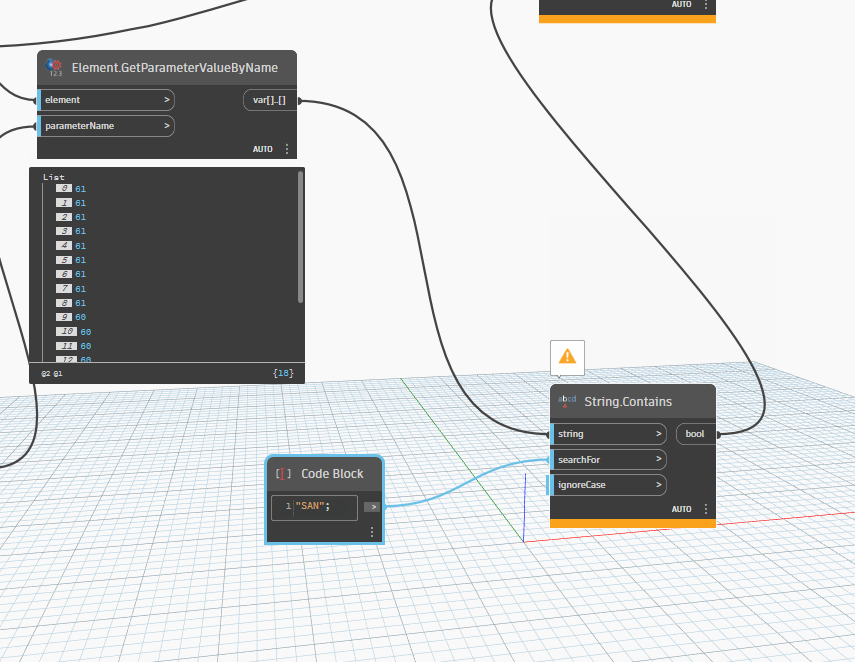
Ok so like bvs1982 said in a post above I have some converting to do. Are there any learning videos on Dynamo to figure out how to do this? Or is Dynamo Prime the only thing offered? Just wondering because reading all of that would take alot of time.
There’s a Learn link at the top of this page with a bunch of options but the Primer is the best place to start. There are also a ton of videos and resources out on the web - plenty of YouTube channels, shared presentations, and blogs covering a ton of content. Yes, it may take some time at first but that’s completely expected with learning a new skill of any kind. Taking the time to go through the training material will make it much faster though. And you always have the forum available for questions, but you’re going to get much further much faster by working through those issues in a structured format rather than just guessing and checking. That being said, a big part of this is just trial and error. Try something. See what happens. Try to understand any warnings or errors you get and attempt a fix.
Any reason you aren‘t using the Appearance Profiler tool in NW ?
It’s probably easier for changing colours based on rules such as search or selection sets- rather than in Revit.
Alternatively- view filters in Revit
Andrew,
Appearance Profiler works in Navisworks. Unfortunately, Stratus does not have this feature and it is a bigger deal. All of the fabrication services show up gray in Stratus and you can’t tell what is what. As far as the view filters they only work in fabrication parts in Revit and do not transfer into the export for Navisworks or Stratus.
This gets further into the need to know the best way to accomplish something in stratus. As I noted before I hadn’t heard of it before this thread so I’m not sure where to start on that - does their product support or user community have a recommendation?
I wanna stay a bit on topic, so maybe this will help you understand some things without going through the Dynamo Primer @Pipelayer.

1 Like
Thank you. I am about half way through Primer right now. This stuff is confusing lol. I know it’s on me as to why I can’t accomplish this right now because I know its possible to set the color of Fabrication Parts so that they keep their colors when exporting. I just am not well versed in Dynamo at the moment. Right now I can’t seem to get the right nodes to read my fabrication parameters. Thanks for responding though and I appreciate your graph,
That graph is to give you some understanding on how Dynamo works.
FYI
I learned Dynamo without reading the Primer .
I spend hours and hours on these forums and watching YouTube videos.
I started with small ‘challenges’ and when i got stuck i looked for topics here about what i tried to achieve. Dynamo is very much trial and error at first (in my opinion).
I also learned a lot by looking at examples (here) and reverse engineering scripts. Just my 2 cents.
Have a good look at my example  .
.