Dears,
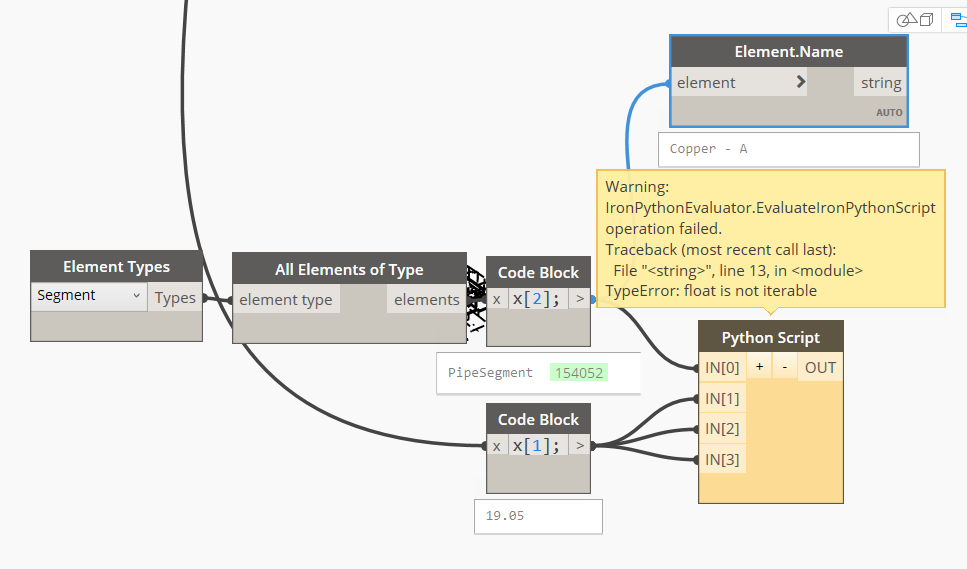
I’m trying to create a python code to add a new sizes for a certain pipe segment, but i get an error of " The float is not iterable" as shown below, Please Advise??
The Python code is as following :
import clr
clr.AddReference(“RevitAPI”)
from Autodesk.Revit.DB import *
from Autodesk.Revit.DB.Plumbing import PipeSegment
clr.AddReference(“RevitServices”)
from RevitServices.Persistence import DocumentManager
from RevitServices.Transactions import TransactionManager
doc = DocumentManager.Instance.CurrentDBDocument
#Les entrées effectuées dans ce noeud sont stockées sous forme de liste dans les variables IN.
dataEnteringNode = IN
elem = UnwrapElement(IN[0])
TransactionManager.Instance.EnsureInTransaction(doc)
for NominalDiameter, InnerDiameter, OuterDiameter in zip(IN[1], IN[2], IN[3]):
NominalDiameter = UnitUtils.ConvertToInternalUnits(NominalDiameter , DisplayUnitType.DUT_MILLIMETERS)
InnerDiameter = UnitUtils.ConvertToInternalUnits(InnerDiameter , DisplayUnitType.DUT_MILLIMETERS)
OuterDiameter = UnitUtils.ConvertToInternalUnits(OuterDiameter , DisplayUnitType.DUT_MILLIMETERS)
try:
elem.AddSize(MEPSize(NominalDiameter,InnerDiameter,OuterDiameter,True,True))
except:
elem.RemoveSize(NominalDiameter)
elem.AddSize(MEPSize(NominalDiameter,InnerDiameter,OuterDiameter,True,True))
#Affectez la sortie à la variable OUT.
OUT = IN
You are providing a single object, not a list, to at least one of the inputs. If you do not want to modify the python code, you can use a List.Create node to ensure that your input will be a list. Otherwise, you can write a function like this and apply it to each input to ensure that each input will be a list:
def make_list(lst):
    if not isinstance(lst, list):
        return [lst]
    return lst
I tried using list but with no success, I got another error as shown below,
Instead of isinstance(lst, list) try hasattr(lst, '__iter__')
do you mind if you put it into my script in order to get your point
You can use the above function to make your single element into a list containing the single element. For example:
def make_list(lst):
    if not hasattr(lst, '__iter__'):
        return [lst]
    return lst

elem = make_list(UnwrapElement(IN[0]))
You can do the same for each of the other inputs and assign them each to a variable, e.g.:
nominal = make_list(IN[1])
inner = make_list(IN[2])
outer = make_list(IN[3])
the same error occured, I think the problem is not creating a list
I would add your list of elements to your zip function. The way your script is currently set up, you are trying to modify the list of elements rather than the element itself.
for elem, innerD, outerD, nominalD in zip(elems, inner, outer, nominal):
    # Convert each measurement and modify each element here
got the error " unknown Element is not iterable" 
I’m trying to use the script like this :
import clr
clr.AddReference("RevitAPI")
from Autodesk.Revit.DB import *
from Autodesk.Revit.DB.Plumbing import PipeSegment

clr.AddReference("RevitServices")
from RevitServices.Persistence import DocumentManager
from RevitServices.Transactions import TransactionManager

doc = DocumentManager.Instance.CurrentDBDocument

#Les entrées effectuées dans ce noeud sont stockées sous forme de liste dans les variables IN.
dataEnteringNode = IN

elem = doc.GetElement(IN[0])

TransactionManager.Instance.EnsureInTransaction(doc)

for dn, di, de in zip(IN[1], IN[2], IN[3]):
	DN = UnitUtils.ConvertToInternalUnits(dn , DisplayUnitType.DUT_MILLIMETERS)
	Di = UnitUtils.ConvertToInternalUnits(di , DisplayUnitType.DUT_MILLIMETERS)
	De = UnitUtils.ConvertToInternalUnits(de , DisplayUnitType.DUT_MILLIMETERS)
	try:
		elem.AddSize(MEPSize(DN,Di,De,True,True))
	except:
		elem.RemoveSize(DN)
		elem.AddSize(MEPSize(DN,Di,De,True,True))

#Affectez la sortie à la variable OUT.
OUT = IN
finally i got another error of "Expected reference got list"
You are using a list as your argument for the Document.GetElement method. GetElement accepts the following overloads:
String (UniqueId)
ElementId
Reference
However, you already have the elements themselves as your input, so using GetElement isn’t necessary. You need to unwrap the DesignScript elements to use them with the Revit API using the UnwrapElement function as you were doing before. Add “elem” to your zip function and process each pipe segment with its respective measurements.
import clr
clr.AddReference("RevitAPI")
from Autodesk.Revit.DB import *
from Autodesk.Revit.DB.Plumbing import PipeSegment

clr.AddReference("RevitServices")
from RevitServices.Persistence import DocumentManager
from RevitServices.Transactions import TransactionManager

doc = DocumentManager.Instance.CurrentDBDocument

#Les entrées effectuées dans ce noeud sont stockées sous forme de liste dans les variables IN.
dataEnteringNode = IN

elem = UnwrapElement(IN[0])

TransactionManager.Instance.EnsureInTransaction(doc)

for dn, di, de in zip(IN[1], IN[2], IN[3]):
	DN = UnitUtils.ConvertToInternalUnits(dn , DisplayUnitType.DUT_MILLIMETERS)
	Di = UnitUtils.ConvertToInternalUnits(di , DisplayUnitType.DUT_MILLIMETERS)
	De = UnitUtils.ConvertToInternalUnits(de , DisplayUnitType.DUT_MILLIMETERS)
	try:
		elem.AddSize(MEPSize(DN,Di,De,True,True))
	except:
		elem.RemoveSize(DN)
		elem.AddSize(MEPSize(DN,Di,De,True,True))

#Affectez la sortie à la variable OUT.
OUT = IN