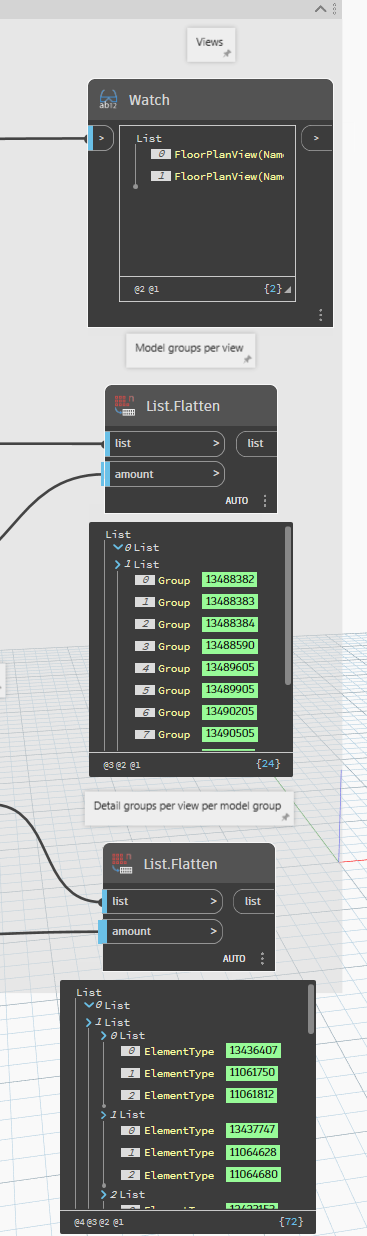
I’ve been trying to make a script which will turn on many detail groups from several model groups in a series of views. I have everything up to the very final step which I cannot figure out. I’ve found several topics on here and tried the nodes/code but to no avail. I’ve tried doing it with chatGPT and also asked it to modify the other examples but nothing I got would work for me.
Below is the last portion of my script where I have lists for all views, all groups and all detail groups. I’ve also attached the script although it might be slightly specific and not work?
I had a little time this afternoon, togther with chatGPT I managed to figure this out, code below
# --- Import Revit and Dynamo API dependencies ---
import clr
import sys

# Add .NET assembly references for Revit API access via pythonnet
clr.AddReference("RevitAPI")
clr.AddReference("RevitNodes")
clr.AddReference("RevitServices")

# --- Revit API Imports ---
import Autodesk
from Autodesk.Revit.DB import *

# --- Dynamo Revit Wrappers ---
import Revit
clr.ImportExtensions(Revit.Elements)  # Enables UnwrapElement() and other helpers

# --- Dynamo Revit Services ---
import RevitServices
from RevitServices.Persistence import DocumentManager
from RevitServices.Transactions import TransactionManager


# --- INPUTS ---
# IN[0] -> list of lists of model groups (each sublist corresponds to a view)
# IN[1] -> list of lists of lists of detail groups (sublist per model group, per view)
# IN[2] -> list of views (one per outer list)
modelGroups = UnwrapElement(IN[0])
detailGroups = UnwrapElement(IN[1])
views = UnwrapElement(IN[2])


# --- DOCUMENT REFERENCE ---
doc = DocumentManager.Instance.CurrentDBDocument


# --- START TRANSACTION ---
TransactionManager.Instance.EnsureInTransaction(doc)


# --- SAFETY CHECK ---
# Ensure all inputs are present and non-empty
if not (modelGroups and detailGroups and views):
    OUT = "One or more inputs are empty or invalid."
else:
    # --- MAIN LOGIC LOOP ---
    # Iterate through each view with its corresponding model groups and detail groups
    for v, modelList, detailLevelList in zip(views, modelGroups, detailGroups):

        # Iterate through each model group and its corresponding list of detail groups
        for m, detailSubList in zip(modelList, detailLevelList):

            # Iterate through each individual detail group for this model group
            for d in detailSubList:

                # Show the attached detail group in the specified view
                m.ShowAttachedDetailGroups(v, d.Id)


# --- END TRANSACTION ---
TransactionManager.Instance.TransactionTaskDone()


# --- OUTPUT ---
# Return the original model groups back to Dynamo for reference
OUT = IN[0]