List levels 6 deep

Just when you think you understand all there is to do with list levels something that should be obvious comes up and bites…

I have inputs from linked models that I want to keep separate but the sublists I want to flatten.

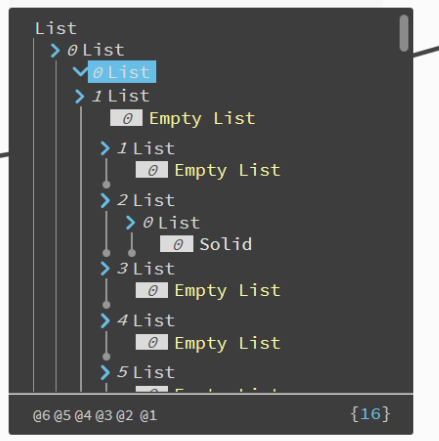
So list [0] and list [1] are items from two Revit models that I want to keep in their own lists.

I’ve expanded list[1] here and you can see I have sublists.

I want to remove empty lists and only keep the items (you can see a solid here)

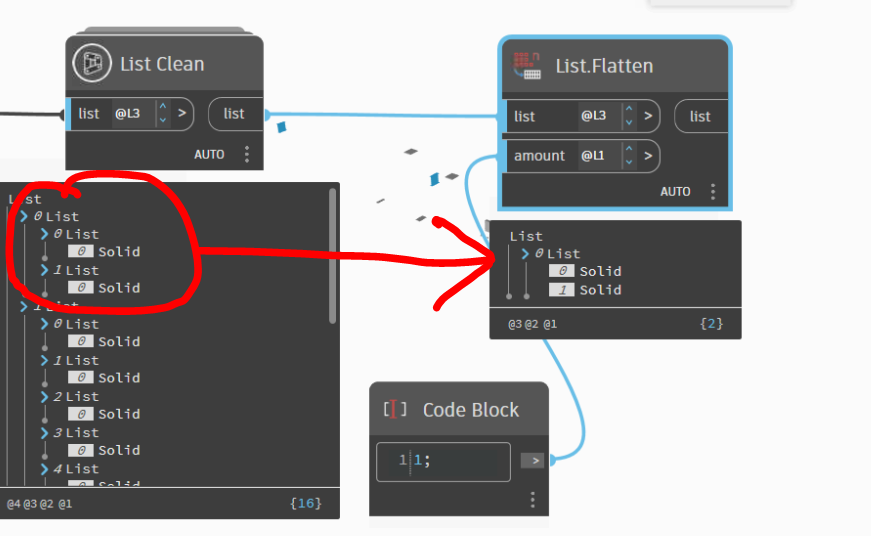
I’ve tried every variation I can think of but this is the best I’ve got…

I want flattened list under red arrow, not different lists.

So the lists are like this

But this only does list [0].

@Alien

did you also try list.lacing maybe the longest?

I added a List.Flatten sooner and it seems to work now.

Not sure this is the best solution.. But it’s not horrible so I’m marking it as solved. If anyone has other suggestions let me know.

Thanks!

1 Like

Have you tried normalizedepth to pull everything to level2? That’s some black magic

1 Like

It’s because you’re specifying an amount. The amount value determines what structure you retain while flattening. The default value of -1 removes all structure. A value of 1 (like you used) would retain one level of lists under the flattened range.

3 Likes

@kovacsv Not heard of that node before. Interesting node… :slight_smile:

@Nick_Boyts I burst out laughing when I read your post… I felt I was doing something really dumb.
As you often do, you confirmed my suspicions. :person_facepalming:
I thought I’d tried that. Doh!

Thanks both!

1 Like