Creating many Instances and Placing Key Note Parameter Workflow

Goal: A user selects a Key note, and inputs Area Height and Quanity, and instances will be created automatically. This is a design plugin for DD, programmers.

Behind the scenes: The graph preselects data, for key note drop down, from a pre-built schedule. It utilizes a custom programming block.

Goal Clarification: When a certain parameter selects key note, pre-populated data augments that instance, such as changes its color.

Problem See Image.

The user wants 10 instances. Remember, the family is already preselected behind the scene. My problem is, how do I generate 10 instances? Ideally, I would like to do this workflow.

Proposed Workflow For each instance out of total instances, set parameter X to Y, repeat until we complete Z amount preselected quantity.

What I researched: I see that there are so many FamilyInstance Nodes. I see that some people use coordinates, specifically the FamilyInstance.ByCoordinates node, where inputs are familyType,x, y, and z. If those coordinates are left empty, then it defaults to zero.

Goal Clarification The designer will go down the programming list, for example: Offices, Lobby, Storage, etc. When they set Office to 10, it would be nice if they create a row of ten. Then, ideally, it would be nice that if they run the plugin again, and add 5 storages, that it wouldn’t be plopped on the already 10 office instances.

Any help would be appreciated.

What is “area” and “height” here?

Assuming “area” is the area of the object, and ‘height’ is the height of the rectangle, and that you’re calculating the width by area/height…

Well you could add a spacing factor (say 1?) to the width and generate a grid of points for the room type, then create an instance at each location.

I don’t recommend using Datashapes UI here, and certainly not yet:

  1. It’s slower than regular nodes by a fairly large factor, and the type of inputs you have can be made by number nodes and a select model element node all marked as input. That takes ~3 seconds to build and things will run faster via player (or any other method that allows input configuration) than what you get with Datashapes UI nodes.
  2. Your process isn’t defined yet so your putting the UI before “can we make it work” has been confirmed. If you can’t get the content to generate then every minute you spent building this UI is lost - function first; UI second.
  3. The IronPython2 dependency means you’re putting your company and every company you work with at risk by deploying this at scale (which I assume is the reason for the UI - otherwise you would just use number sliders in your graph, right?).

Better option at this point is to leave UI for later, or just use nodes marked as input.

Ah. that makes sense. Right now we are in the testing stages and definitely will weed out potential problems before deployment. Perhaps, will have to keep it UI-less and utilize Dynamo Player instead.

What has worked so far: UI, Generating programming block instances.

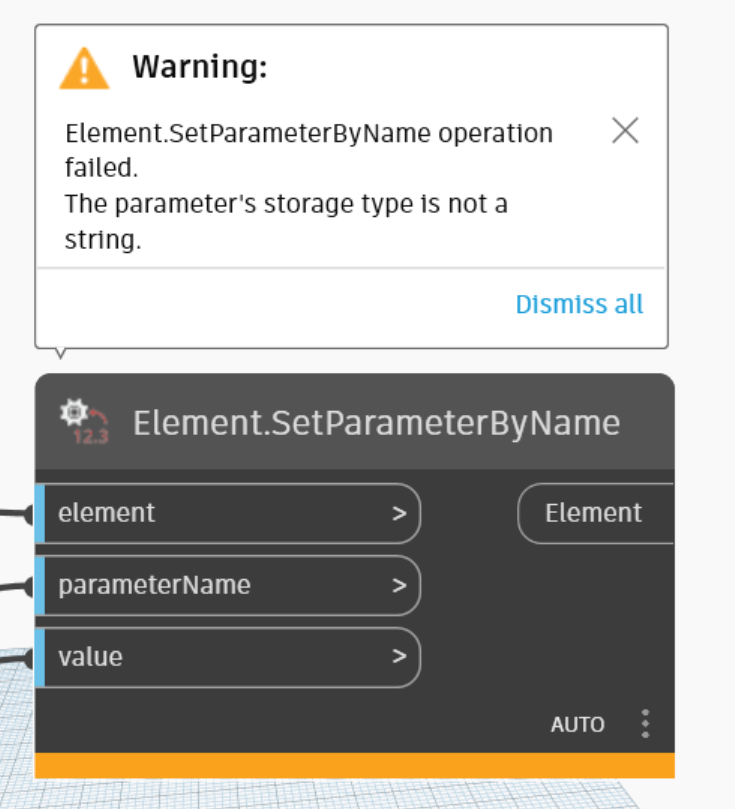
What hasn’t worked so far: Setting Key Note, See following Pictures


I guess, this is the wrong storage type. I wonder how i can set that data better in my codeblock.

Any help appreciated.

This is what I think I need to do and will try in the meantime.

Locate the index that corresponds the key note I am looking for, and perhaps pull that element and feed that as the value?

Correct. Without seeing the model I can’t tell what the storage type is, but you could try getting the parameter value from an existing instance. If it is a number then you’ll have to find the corresponding key from the result. Likely doable by building a dictionary from your standard values.

So, I am using RevitLookup on an instance of this spacing block.

My goal is to find out its storage type.

I wonder: if it isn’t a string, what could it be? An integer? A boolean? Some other type?

Here’s another Snoop view too.


Is this from a key schedule? Without the model I can only guess at data types.

Element.GetParameterValue returns what in Dynamo?

Thanks for your help. I will need to dig a bit and get those details.

Could you explain why the IronPython2 is a vulnerability when we use data-shape nodes for UI?

Python moved from Python 2 to Python 3 in 2008.

Python 2 had significant adoption, and it was underlaying tech for many, so they kept 2 supported for awhile - 2020 was the end of life date believe it or not. That’s 12 years for people to upgrade. Once a software stops being supported it no longer receives security patches.

IronPython 2 was an implementation of Python built to run in .NET. It consumes Python so in theory it can patch vulnerabilities in Python 2 after it stops being supported. It was end-of lifed in 2022, and as such both Python 2 and IronPython 2 have all the security patch that they’ll ever get.

Dynamo stopped shipping IronPython 2 in 2022, and let people know this was coming in 2021.

It is now 2025, which means that there have been no security patches for IronPython 2 since 2022, and what we got then was really a partial patch since it didn’t include any Python patches.

This means that any known vulnerability in Python2 or IronPython2 is just there, waiting for someone to take advantage of. There are hundreds of them too - search google for ‘Iron Python 2 Extended Support’ and you’ll find some companies who charge significant money to patch the old builds based on the fixes put into play in Python 3 and their own work, and even that is partial coverage. Some of them advertise 100’s of fixes. Some of which allow remote code execution, and don’t require necessarily require sketchy user action to run (though again AEC sees more sketchy user action by the nature of our work)…

Your firm pays money for really expensive locks on the front door (i.e. antivirus, etc.), but you have left the door sized window adjacent to the patio wide open. And as you work in AEC you are at a higher risk of ransomware and other infosec incidents than most other industries as we pretty much have to open oddball files every day to do our jobs - unlike say medical fields where ‘only input is from users keyboards’ we send and receive files constantly as we have to collaborate.

And yet we keep that window open… and it just gets bigger and bigger as time goes on.

Now this doesn’t mean that you shouldn’t use it. Nor does it mean that there is an active incident so everyone should pull all the plugs on the network to keep things safe. But it does mean that you likely shouldn’t be building any new tools in that tech, as it is a matter of time until we get a situation where either a worst case scenario requiring ‘unplug everything from the network right now!’ or less severe scenario of ‘well that tool we spent all that time on won’t work thanks to a windows update so we need to start updating now…’ or the best case scenario ‘hey this doesn’t work at all in the 20XX product release so now we have to redo a bunch of work or not have the tools we just finished building on that new project we just landed.’

Thank you so much for highlighting this oversight on my part.

So, moving forward solutions that utilize lean nodes that don’t utilize Python is the way forward or moving towards creating plugins in C# is the way forward?

Will have to rethink some things.

Thanks again,

Evan

Not really - Python is fine, but for the engine of your Python node you want CPython3 (true support), IronPython3 (unofficial support) or PythonNet (beta support for now). You don’t want IronPython2 engine.

C# is also secure for sure. You don’t have to convert to an add-in though, C# can be used to develop custom nodes which out perform Python by a long shot. Security wise there are less concerns as well as you won’t likely distribute it wide enough to be an effective vector for bad actor, and even if you do what you us is likely a standard Dynamo/Revit/Civil3D API which would be patched if a vulnerability were found.

Remember that all security is reactive - just a question of who does all the acting. With supported software someone will fix the holes as they are found so if you aren’t already impacted when the update comes out you’re good. The first hit always has the full reactive effort though.

“Some built-in parameters, such as those for color or level, have special data types which are not available for use with user-defined parameters and which have no representation in the Revit user interface or API. For these built-in parameters, this method returns an empty ForgeTypeId instance.”

So that looks like a user defined project or element parameter. Just use the regular Revit UI to look at it. And begs the question - “How did you do that?”

I was able to see that Data-Shapes nodes use Iron Python2 by right clicking one of their nodes, and clicking ‘Edit Custom Node’. Looking into the python node, I see that it is running Iron Python2, and fully understand why that is bad.

However, is there a way to see if there are packages out there that utilize the safe Python frameworks like CPython?

I tried looking into a Rhythym node, and I didn’t get that same option to right click it and ‘Edit Custom Node’.

I think I read some posts of yours @jacob.small , and could of swore that you might have mentioned that there are some proceseses out their that can determine what Python frameworks which scripts have, but since I am creating graphs instead, I wonder if that applies.

Thanks again for all of your insight in this post.

Evan

Switch to pyRevit. :wink:

All of that is built on IronPython2 still, so… yeah. :frowning:

If you’re placing a Python node on canvas you can choose the engine.

If you are placing zero touch nodes on canvas Python isn’t a security concern. These are the nodes which cannot be edited.

If you are using dyf based nodes when you download the package you should see IronPython2 listed as a dependency in the package manager.

If you already have a library of packages in use and want to flag IronPython2 packages you can write some Python (using the CPython engine) to flag any nodes/packages which use IronPython2. This post of mine from nearly a month back has a POC to do such that: Reload Family from Folder - #20 by jacob.small

pyRevit 5.0.1 is out and ships with IronPython 3.4 and Cpython. You can select from a number of different python engines. Even 4.8 could use IPY 3.4 - although it was in WIP status.
5.0’s big push was to get everything built to use CPython.

You also have the advantage of having apps in both IPY and CPY depending on what you are doing.

Plus, you don’t even have to write in python at all. You can use C# if you like. Or VB .Net.

The below is the settings for 4.8.13 and I’ve found 3.4 works well. I’ve installed 5.0 at home but our office IT is fussing with the install of 5.0 (We have VRay 7.0 and Enscape 4.3 issue to deal with first.)

Would that require Revit 2025? I have PyRevit installed in 2024, and that is how I create my buttons within a ribbon.

I guess, what is the bare minimum required to utilize those feature you showed for Revit 2024?

I’ll look at that PyRevit link you referred to earlier in this post.

Thanks,

Evan

pyRevit 5.0.1 supports all current ADSK supported versions. Github lists versions back to 2013. But i can verify that is still valid.
I’m running 2023, 204 and 2025 all on the same system.
…ver 4.8 didn’t support Revit 2025.

Unfortunately it still deploys IP2 so while it gives the advantage of starting g to migrate, the window is still there and just as open… Until it is no longer included it is insecure.

Delete key can take care of that and you can use the CLI to manage your own deployment and restrict what is installed and which versions of Revit have access to pyRevit. You want 2.7 outta there - just make it so. That’s the nice thing about open source. 2.7 is currently only there for the antique versions of Revit (…we had the Corp of Engineers using 2018 until recently.) Just don’t install.