Hi,
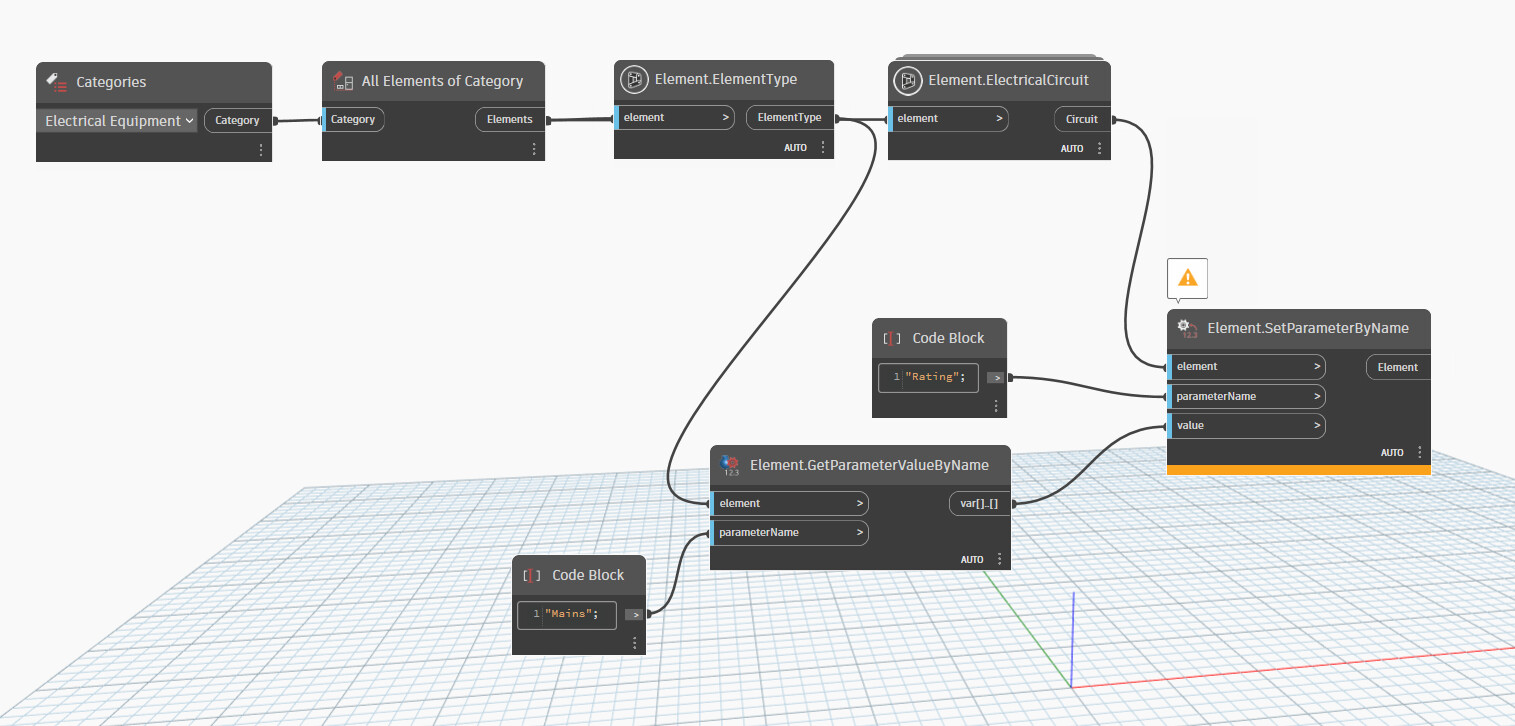
I am trying to automatically generate a power circuit for panelboards by just running a script. It can be a tedious process to select a panel, then hit the power button for every time I want to generate a circuit. I have a script that will automatically size the circuit breaker “rating” parameter based on the value I have in a shared type parameter (see image and script below) but I would like it to create a power circuit first and then populate the rating. Note: The error message I am getting is just because the “Rating” parameter is not a string.
The workflow I would love to have is place a few panels and transformers in a view, then run the script that automatically pulls a power circuit to each piece of equipment and then that same script fills out the circuit breaker rating based on the type properties of the family.
Your image didn’t post. Try again and make sure you have all your data visible in the node preview bubbles.
The error is telling you that you’re providing a string value when the parameter is not a string. I’m guessing your parameter takes a number but you’ll have to confirm that yourself.
You need to pin the node preview bubbles so we can see what’s happening with your data, but (assuming it’s still the same error) you’re still feeding the parameter the wrong value.
What kind of parameter is Rating? It’s not a string parameter. Is it a number parameter?
Thanks for your response. The error message itself isn’t a concern, I just wanted to clarify that it’s appearing because the node is expecting a string value. The Rating parameter in Revit is an electrical current parameter. Even though it represents a numerical value, the node still recognizes and processes it correctly; it just generates the message as a result.
What I’m trying to achieve is automating the creation of a power circuit before running my script. That’s where I’m currently stuck. I’ve successfully set up the script to replace the Rating parameter value based on a preset, and that part is working well. However, I need to figure out how to create the power circuit automatically as the first step.
Right now, engineers have to manually select an element (or multiple elements), click the power button to generate a circuit, and then manually input the rating value. My goal is to automate this entire process so that once elements are placed in the model, running the script will create the power circuit and assign the rating automatically. I’m just not sure how to accomplish this in Dynamo at this stage.
Any insights or guidance would be greatly appreciated!
The two options I linked above are the methods for creating an electric circuit in Revit.
The bigger question is how are you defining a circuit? You want designers to place all the elements and then automatically create circuits? Between which elements? Is it always one element per circuit? To the nearest panel? You’re going to have to provide some sort of logic for how elements get grouped, assigned to panels, and located.
I see your point. Right now, my focus is solely on automating the step that selects the button to generate a circuit. I don’t even mind if the circuit is initially empty—if the script can create the circuit and apply the Rating parameter, the designer can manually assign it to the appropriate panel afterward.
This automation would specifically apply to electrical equipment like panels and transformers, not to other elements such as receptacles or light fixtures. It’s just an idea I had, and I wanted to explore whether it’s feasible.
That said, I’m not sure if this request is possible within Dynamo based on my current understanding. If this level of automation isn’t achievable, I’m happy to remove the post.
Again, I suggest you look at the two methods for creating a circuit. Those are your only two options. Revit doesn’t allow empty circuits, so you have to include something. If you’re only dealing with equipment that’s on its own circuit then it’s an easy 1-to-1 creation. The connector method would probably be the simplest in that cases.
It’s definitely possible. It’s all available in the API.
I would be looking for the panel to panel 1 for 1 circuit creation. Is it possible to show me how you would start that? That’s where I am stuck. I don’t know Python well enough yet to know exactly how to set that up. Or if there is a way to start that using Dynamo nodes. I can fumble my way around in Dynamo.
I understand if it’s too much work or if it’s not something anyone wants to help with.
It’s more that you need to show some initial effort first. The forum is not a place for requesting others to do work for you. You need to make an attempt yourself. If that means starting with some python introductions then that’s where you need to start. There are plenty of resources here on the forum, both for general python and probably for circuiting as well. Of course, you can always continue to look for custom packages that already have a working node but that can be a mixed bag.