\
**Category:** Revit\
**Tags:** excel, dynamo\
**Created:** [January 18, 2024, 10:22am UTC](https://forum.dynamobim.com/t/save-data-as-html-table-is-it-possible/97276 "2024-01-18T10:22:43Z")\
**Posts on this page:** 14\
**Page:** 1
**Author:**  [@bvs1982](https://forum.dynamobim.com/u/bvs1982)\
**Post date:** [January 18, 2024, 10:22am UTC](https://forum.dynamobim.com/t/save-data-as-html-table-is-it-possible/97276/1 "2024-01-18T10:22:43Z")
Is there a way to save data as HTML table?
Or
Save a Excel file as HTM page after the creation of the Excel file?
---
**Author:**  [@Draxl\_Andreas](https://forum.dynamobim.com/u/Draxl_Andreas)\
**Post date:** [January 18, 2024, 11:45am UTC](https://forum.dynamobim.com/t/save-data-as-html-table-is-it-possible/97276/2 "2024-01-18T11:45:58Z")
@bvs1982 ,

you can switch to [PyRevit](https://discourse.pyrevitlabs.io/) here you are able to save HTMLs
or when you talk only about excel …
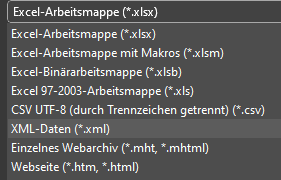
KR
Andreas
---
**Author:**  [@bvs1982](https://forum.dynamobim.com/u/bvs1982)\
**Post date:** [January 19, 2024, 2:24pm UTC](https://forum.dynamobim.com/t/save-data-as-html-table-is-it-possible/97276/3 "2024-01-19T14:24:56Z")
I didn’t know [PyRevit](https://discourse.pyrevitlabs.io/) had such an option, but i doubt it can do what i need / am after.
I know you can save a file as .htm / .html in excel, but you have to do it manually.
I cam across [this](https://bimextension.com/bimxhtml-dynamo-html-web-page/) post on [https://bimextension.com/](https://bimextension.com/).
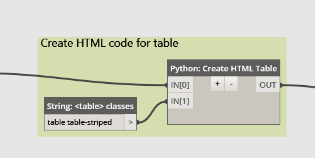
I found all that pretty interesting and more like what i am after, but the post is fairly old.
---
**Author:**  [@jacob.small](https://forum.dynamobim.com/u/jacob.small)\
**Post date:** [January 19, 2024, 2:28pm UTC](https://forum.dynamobim.com/t/save-data-as-html-table-is-it-possible/97276/4 "2024-01-19T14:28:36Z")
I am not aware of a fully supported package for generating the full HTML, but it certainly could be done.
That said, without knowing more of what you’re after generating we can review options from there. My guess is that it’d be easier/more scalable to build the HTML once, and pointing at the right dataset which you export from Dynamo rather than building the full HTML each time.
---
**Author:**  [@bvs1982](https://forum.dynamobim.com/u/bvs1982)\
**Post date:** [January 19, 2024, 2:36pm UTC](https://forum.dynamobim.com/t/save-data-as-html-table-is-it-possible/97276/5 "2024-01-19T14:36:20Z")
For now i am just exploring possibilities 😅.
In short i want to export data per Family Type and save that as an html page.
I want to create a address at the same time and put that in the Family Types url so you can
click that and you can see exported data in a browser / on the web.
Maybe in the future i wanna look into being able to change the data and get that into Revit
from the web.
Also came across [this](https://forum.dynamobim.com/t/bimxhtml-dynaweb-packages/14592/10) post, but this is also fairly old (2017).
But for now i just wanna be able to create a table for the web / as htm.
---
**Author:**  [@jacob.small](https://forum.dynamobim.com/u/jacob.small)\
**Post date:** [January 19, 2024, 3:21pm UTC](https://forum.dynamobim.com/t/save-data-as-html-table-is-it-possible/97276/6 "2024-01-19T15:21:58Z")
> [@bvs1982](#):
>
> In short i want to export data per Family Type and save that as an html page.
Would you want a view of the geometry as well, or just a ‘table’?
If geometry is also of interest, I recommend you move past Dynamo and look into APS (formerly Forge) as the capabilities you’re after are built into the tool and maintained by Autodesk directly. In fact the ‘[intro](https://tutorials.autodesk.io/tutorials/simple-viewer/viewer)’ tutorial for the viewer goes over how to do almost everything you’re after with nearly no customization involved.
If you want geometry but you are APS adverse you can look into rebuilding the wheel on your own, but it’s a BIG lift. Perhaps something could be done with one of the js based IFC readers. You’ll need some web coding experience for that.
And the last option is the geometry-free version, where you build an HTML template, select an instance/type via the drop down, and a chart is displayed. All of the data which is exposed could be populated by running a Dynamo graph, but you’d be limited to text display without getting much deeper (see the two proceeding instances).
---
**Author:**  [@bvs1982](https://forum.dynamobim.com/u/bvs1982)\
**Post date:** [January 19, 2024, 3:38pm UTC](https://forum.dynamobim.com/t/save-data-as-html-table-is-it-possible/97276/7 "2024-01-19T15:38:19Z")
> [@jacob.small](#):
>
> Would you want a view of the geometry as well, or just a ‘table’?
For now just tables.
---
**Author:**  [@jacob.small](https://forum.dynamobim.com/u/jacob.small)\
**Post date:** [January 19, 2024, 3:54pm UTC](https://forum.dynamobim.com/t/save-data-as-html-table-is-it-possible/97276/8 "2024-01-19T15:54:57Z")
In which case consider the APS or base HTML setup. Write your HTML in any tool, and setup the dropdown to populate from a list of CSV file names, and the table to populate with the data from the file. Dynamo can then build the CSVs directly and easily. You might even be able to do this with just a power BI base and scrap the HTML need.
---
**Author:**  [@c.poupin](https://forum.dynamobim.com/u/c.poupin)\
**Post date:** [January 21, 2024, 12:09am UTC](https://forum.dynamobim.com/t/save-data-as-html-table-is-it-possible/97276/9 "2024-01-21T00:09:26Z")
Hi,
examples with Python
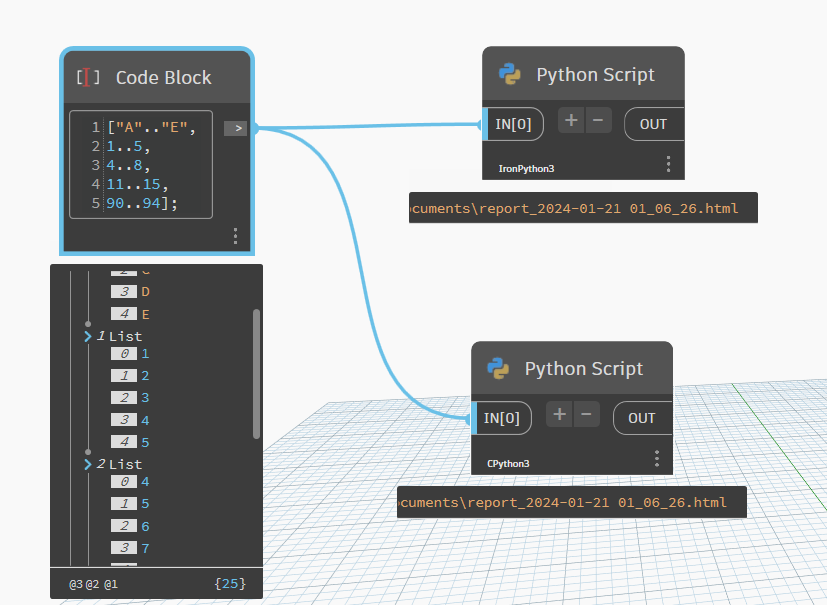

- with pure Python code
```auto
import clr
import sys
import datetime
import System
datenow = datetime.datetime.now().strftime('%Y-%m-%d %H:%M:%S')
exportfolder = System.Environment.GetFolderPath(System.Environment.SpecialFolder.MyDocuments)
reporthtmlfile = exportfolder + "\\report_"+ datenow.replace(':','_') + ".html"
def array_to_html_table(array_datas, out_html_file):
htmllst = []
htmllst.append("")
htmllst.append("")
for sublist in array_datas:
htmllst.append(" | ")
htmllst.append(" | ".join([str(x) for x in sublist]))
htmllst.append(" |
")
htmllst.append("
")
with open(out_html_file, 'w') as f:
f.writelines(htmllst)
array_datas = IN[0]
array_to_html_table(array_datas, reporthtmlfile)
OUT = reporthtmlfile
```
- with pandas library
```auto
import clr
import sys
import datetime
import System
datenow = datetime.datetime.now().strftime('%Y-%m-%d %H:%M:%S')
exportfolder = System.Environment.GetFolderPath(System.Environment.SpecialFolder.MyDocuments)
reporthtmlfile = exportfolder + "\\report_"+ datenow.replace(':','_') + ".html"
import pandas as pd
array_datas = IN[0]
df = pd.DataFrame(data=array_datas[1:], columns=array_datas[0])
df.to_html(reporthtmlfile)
OUT = reporthtmlfile
```
---
**Author:**  [@bvs1982](https://forum.dynamobim.com/u/bvs1982)\
**Post date:** [January 22, 2024, 8:00am UTC](https://forum.dynamobim.com/t/save-data-as-html-table-is-it-possible/97276/10 "2024-01-22T08:00:38Z")
@c.poupin
This is great! Thank you so much for this!
What do i have to change in the code so i can create multiple tables with a different paths/ urls
for each table? Or isn’t that possible?
My end goal is to create x tables with x url is one go.
---
**Author:**  [@bvs1982](https://forum.dynamobim.com/u/bvs1982)\
**Post date:** [January 22, 2024, 2:56pm UTC](https://forum.dynamobim.com/t/save-data-as-html-table-is-it-possible/97276/11 "2024-01-22T14:56:59Z")
With a bit of fiddling
I managed this so far (part of what i want)

Can i add the \ with Python instead of the Code Block ‘solution’?
And is it possible to add a multiple Lists with data and a List of Paths?
Something like this.
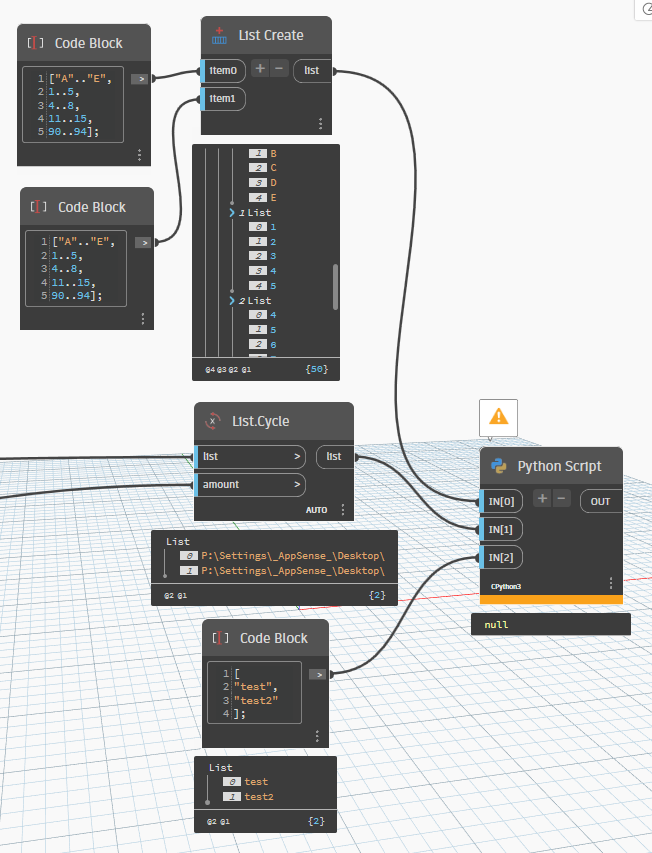
Path will allways be the same for the project.
---
**Author:**  [@Deniz\_Maral](https://forum.dynamobim.com/u/Deniz_Maral)\
**Post date:** [January 22, 2024, 4:37pm UTC](https://forum.dynamobim.com/t/save-data-as-html-table-is-it-possible/97276/12 "2024-01-22T16:37:22Z")
Convert the python into a custom node. You can use list of paths etc.
---
**Author:**  [@c.poupin](https://forum.dynamobim.com/u/c.poupin)\
**Post date:** [January 22, 2024, 8:13pm UTC](https://forum.dynamobim.com/t/save-data-as-html-table-is-it-possible/97276/13 "2024-01-22T20:13:25Z")
Hi, @bvs1982
try to use the zip function
> **[Built-in Functions](https://docs.python.org/3.3/library/functions.html#zip)**
>
> The Python interpreter has a number of functions and types built into it that are always available. They are listed here in alphabetical order.,,,, Built-in Functions,,, A, abs(), aiter(), all(), a...

---
**Author:**  [@bvs1982](https://forum.dynamobim.com/u/bvs1982)\
**Post date:** [January 23, 2024, 8:44am UTC](https://forum.dynamobim.com/t/save-data-as-html-table-is-it-possible/97276/14 "2024-01-23T08:44:02Z")
@c.poupin
Thanks a bunch for this!
I probably elaborate some more on the why all this.