# Placing Family in Shared Coordinate Environment
**URL:** https://forum.dynamobim.com/t/placing-family-in-shared-coordinate-environment/55273
**Category:** Revit
**Created:** [September 18, 2020, 5:54am UTC](https://forum.dynamobim.com/t/placing-family-in-shared-coordinate-environment/55273 "2020-09-18T05:54:06Z")
**Posts on this page:** 11
**Page:** 1
### Author:  [@theshysnail](https://forum.dynamobim.com/u/theshysnail)
#### Post date: [September 18, 2020, 5:54am UTC](https://forum.dynamobim.com/t/placing-family-in-shared-coordinate-environment/55273/1 "2020-09-18T05:54:06Z")
Hi all,
I have been wrestling with this problem for quite some time now and would really appreciate any help. I checked out some of the Coordinate System Transformation posts on the forum but it does not seem to work for me.
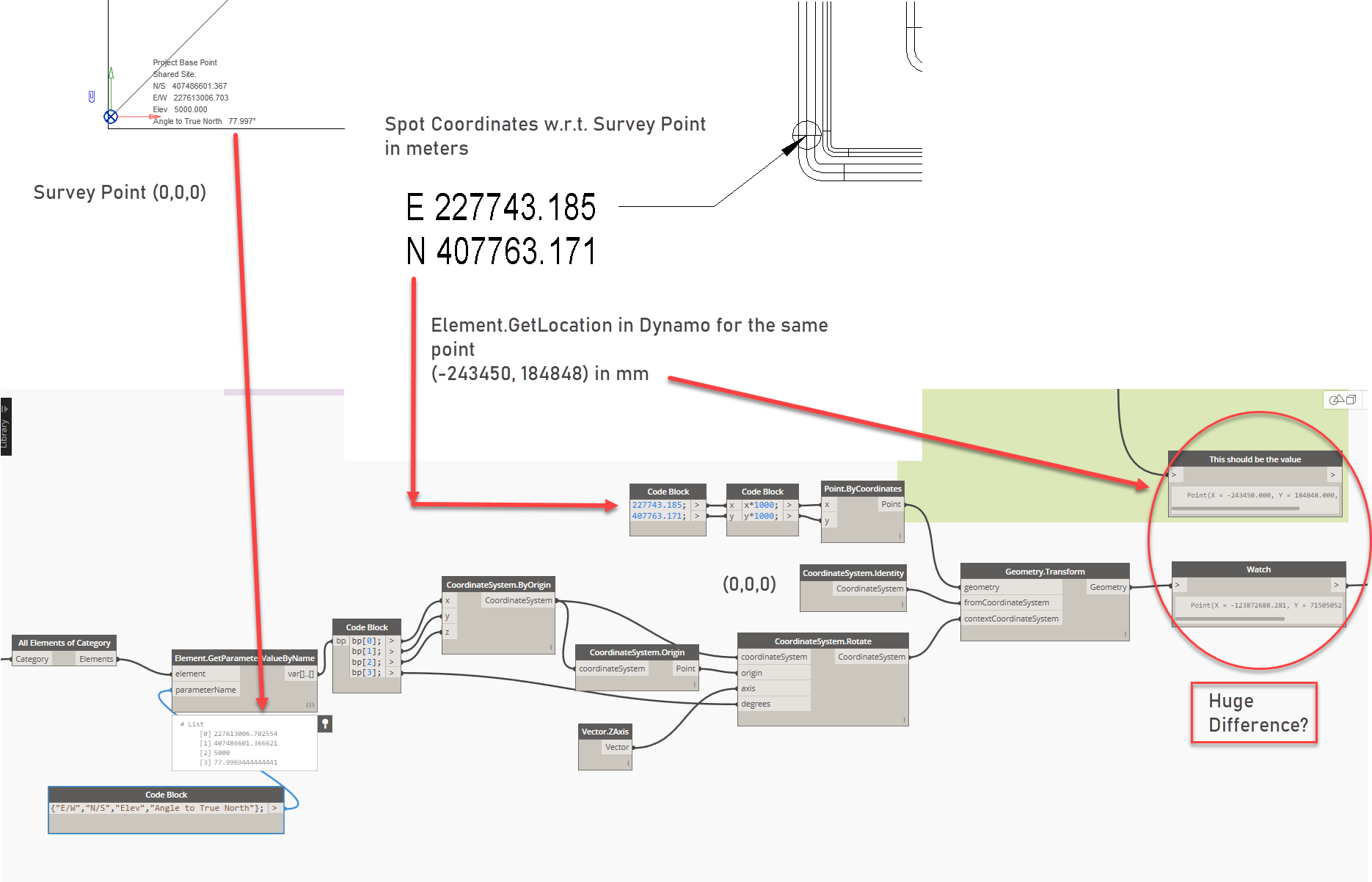
In the picture below, I want to place a certain family at the point, but I am not able to get the desired point coordinates in Dynamo when I use the Spot Coordinates locations (w.r.t. Survey Point) as inputs.
---
### Author:  [@Vasiliki\_Georgoula](https://forum.dynamobim.com/u/Vasiliki_Georgoula)
#### Post date: [September 18, 2020, 11:15am UTC](https://forum.dynamobim.com/t/placing-family-in-shared-coordinate-environment/55273/2 "2020-09-18T11:15:37Z")
You need to rotate the coordinate system in the other direction, so “Angle to true north” \* -1
---
### Author:  [@theshysnail](https://forum.dynamobim.com/u/theshysnail)
#### Post date: [September 18, 2020, 12:44pm UTC](https://forum.dynamobim.com/t/placing-family-in-shared-coordinate-environment/55273/3 "2020-09-18T12:44:19Z")
Thanks. Still, there’s a huge difference and the point family gets placed at a remote location in Revit.
I also tried (360 - Angle to True North).

---
### Author:  [@Vasiliki\_Georgoula](https://forum.dynamobim.com/u/Vasiliki_Georgoula)
#### Post date: [September 18, 2020, 12:53pm UTC](https://forum.dynamobim.com/t/placing-family-in-shared-coordinate-environment/55273/4 "2020-09-18T12:53:30Z")
Can you show how you get the coordinates by Element.GetLocation?
What is that Element? How is it created? Does it come from a linked file?
---
### Author:  [@theshysnail](https://forum.dynamobim.com/u/theshysnail)
#### Post date: [September 18, 2020, 12:58pm UTC](https://forum.dynamobim.com/t/placing-family-in-shared-coordinate-environment/55273/5 "2020-09-18T12:58:26Z")
Yeah, I manually placed a spherical marker point family in Revit as visible in the original post (E 227743, N 407763) and got its location in Dynamo through Element.Location+ node.
---
### Author:  [@Vasiliki\_Georgoula](https://forum.dynamobim.com/u/Vasiliki_Georgoula)
#### Post date: [September 18, 2020, 1:15pm UTC](https://forum.dynamobim.com/t/placing-family-in-shared-coordinate-environment/55273/6 "2020-09-18T13:15:43Z")
ok, you dont need to rotate the coordinate system at all…just connect the nodes like this:

---
### Author:  [@Vikram\_Subbaiah](https://forum.dynamobim.com/u/Vikram_Subbaiah)
#### Post date: [September 18, 2020, 2:04pm UTC](https://forum.dynamobim.com/t/placing-family-in-shared-coordinate-environment/55273/7 "2020-09-18T14:04:06Z")
> [@theshysnail](#):
>
> I want to place a certain family at the point, but I am not able to get the desired point coordinates in Dynamo when I use the Spot Coordinates locations (w.r.t. Survey Point) as inputs.
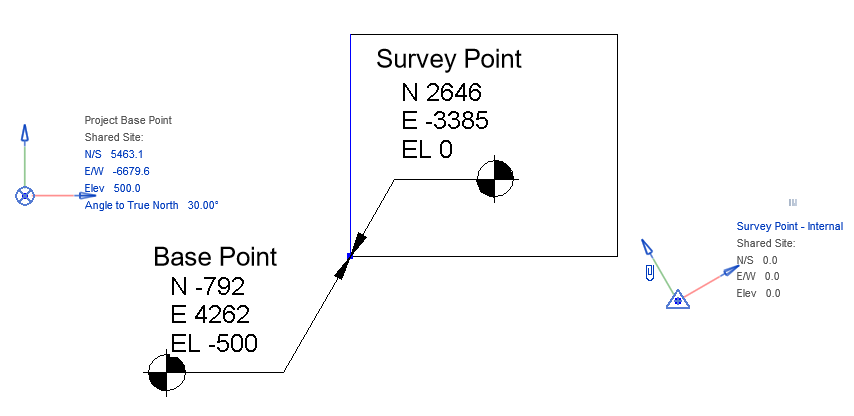
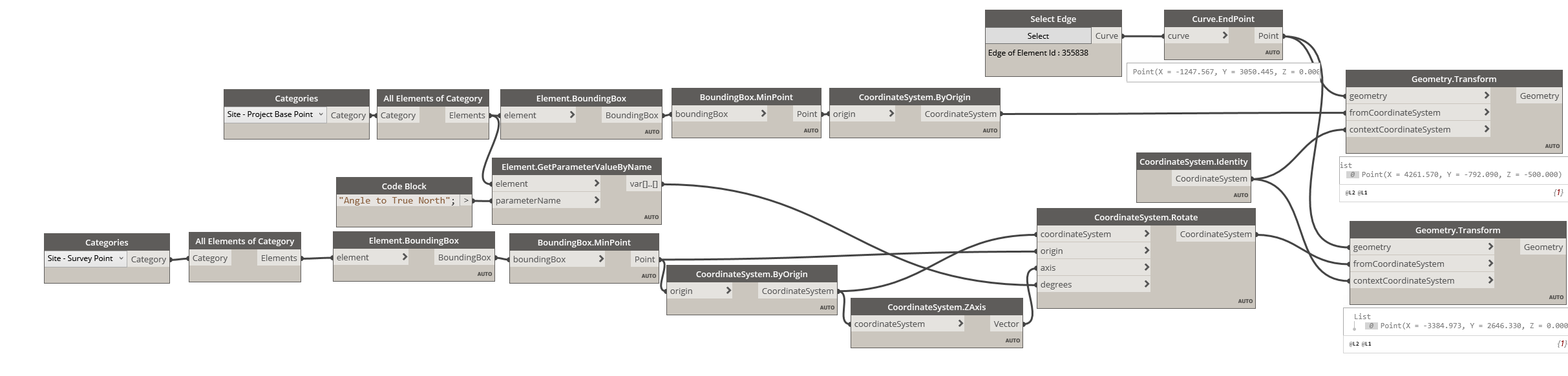
Despite _Angle to True North_ being a _Survey Point_ parameter seems like the _Base Point Coordinate System_ is rotated with respect to the _Project Origin_
[spBp.dyn](https://forum.dynamobim.com/uploads/short-url/s0pDFkw2LZFIBYYp1TtwqwrhjCE.dyn) (30.8 KB)
---
### Author:  [@theshysnail](https://forum.dynamobim.com/u/theshysnail)
#### Post date: [September 19, 2020, 5:15am UTC](https://forum.dynamobim.com/t/placing-family-in-shared-coordinate-environment/55273/8 "2020-09-19T05:15:59Z")
Thanks for the dyn file. But I’m still lost. 😐

---
### Author:  [@theshysnail](https://forum.dynamobim.com/u/theshysnail)
#### Post date: [September 19, 2020, 5:17am UTC](https://forum.dynamobim.com/t/placing-family-in-shared-coordinate-environment/55273/9 "2020-09-19T05:17:09Z")
connected but…?

---
### Author:  [@Vikram\_Subbaiah](https://forum.dynamobim.com/u/Vikram_Subbaiah)
#### Post date: [September 19, 2020, 6:36am UTC](https://forum.dynamobim.com/t/placing-family-in-shared-coordinate-environment/55273/10 "2020-09-19T06:36:25Z")
> [@theshysnail](#):
>
> But I’m still lost.
I’ve demonstrated transforming a point from it’s absolute position to one relative to the Survey Point coordinate system. But seems like you intend to do the reverse
Swap the inputs for _fromCoordinateSystem_ and _contextCoordinateSystem_

[spBp1.dyn](https://forum.dynamobim.com/uploads/short-url/pKONNSSc8Qlb64PA9zAUfkEOgtZ.dyn) (27.5 KB)
---
### Author:  [@theshysnail](https://forum.dynamobim.com/u/theshysnail)
#### Post date: [September 19, 2020, 6:52am UTC](https://forum.dynamobim.com/t/placing-family-in-shared-coordinate-environment/55273/11 "2020-09-19T06:52:04Z")
Thanks a ton! You’re the savior. Easy to track thousands of such points now. @Vikram_Subbaiah