{
{"BasePoint_X", BasePoint_X},
{"BasePoint_Y", BasePoint_Y},
{"BasePoint_Z", BasePoint_Z},
{"Angle of rotation", BasePoint_Angle},
};
}
}
}
```
---
### Author:  [@Alban\_de\_Chasteigner](https://forum.dynamobim.com/u/Alban_de_Chasteigner)
#### Post date: [October 11, 2020, 10:37am UTC](https://forum.dynamobim.com/t/node-with-revit-api-how-get-access-to-current-document/56078/2 "2020-10-11T10:37:08Z")
Hi @georg.grebenyuk,
You can generate a Revit.DB.Document with a simple python script :
```
import clr
clr.AddReference('RevitServices')
import RevitServices
from RevitServices.Persistence import DocumentManager
OUT = DocumentManager.Instance.CurrentDBDocument
```

---
### Author:  [@georg.grebenyuk](https://forum.dynamobim.com/u/georg.grebenyuk)
#### Post date: [October 11, 2020, 11:30am UTC](https://forum.dynamobim.com/t/node-with-revit-api-how-get-access-to-current-document/56078/3 "2020-10-11T11:30:47Z")
Hi, @Alban_de_Chasteigner
If I done as you said - I will get an error:
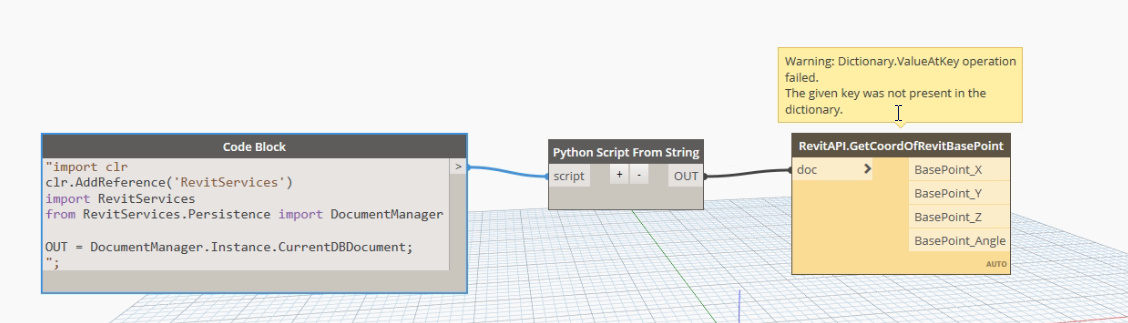
---
### Author:  [@Thomas\_Mahon](https://forum.dynamobim.com/u/Thomas_Mahon)
#### Post date: [October 11, 2020, 12:39pm UTC](https://forum.dynamobim.com/t/node-with-revit-api-how-get-access-to-current-document/56078/4 "2020-10-11T12:39:00Z")
Your dictionary keys - specifically your “Angle of rotation” key - doesn’t match the keys you’ve declared in your MultiReturn attribute. Change it to “BasePoint\_Angle” and you wont get the exception.
---
### Author:  [@georg.grebenyuk](https://forum.dynamobim.com/u/georg.grebenyuk)
#### Post date: [October 11, 2020, 3:07pm UTC](https://forum.dynamobim.com/t/node-with-revit-api-how-get-access-to-current-document/56078/5 "2020-10-11T15:07:33Z")
Yeah, it working!
But how I can get access to current document from C# without that temp-decision with Python?
---
### Author:  [@jacob.small](https://forum.dynamobim.com/u/jacob.small)
#### Post date: [October 11, 2020, 3:50pm UTC](https://forum.dynamobim.com/t/node-with-revit-api-how-get-access-to-current-document/56078/6 "2020-10-11T15:50:22Z")
This could help:
> **[ActiveDocument Property](https://www.revitapidocs.com/2020/c9769a52-5a67-3f36-e10c-676617376366.htm)**
>
> Online Documentation for Autodesk's Revit API: 2015, 2016, 2017, 2017.1, 2018
---
### Author:  [@georg.grebenyuk](https://forum.dynamobim.com/u/georg.grebenyuk)
#### Post date: [October 11, 2020, 5:36pm UTC](https://forum.dynamobim.com/t/node-with-revit-api-how-get-access-to-current-document/56078/7 "2020-10-11T17:36:13Z")
I’m glad for that link, but I can’t understand how it can help me.
I tried some variants with that function and other and main result that I get - nothing methods are not visiable in Dynamo!
I’m amazing why there are no any info on [https://developer.dynamobim.org](https://developer.dynamobim.org) how get access to Revit from Custom Node?
---
### Author:  [@Thomas\_Mahon](https://forum.dynamobim.com/u/Thomas_Mahon)
#### Post date: [October 11, 2020, 6:47pm UTC](https://forum.dynamobim.com/t/node-with-revit-api-how-get-access-to-current-document/56078/8 "2020-10-11T18:47:59Z")
It all depends on what you want to do. @jacob.small suggestion cant be used with zero touch nodes and is only avialable if you are writing Revit addins which implement IExternalCommand.
So you need to establish the following: does your node _even_ need the document as an input? Some custom nodes do have the document as an input in case where they support links for example, but this is a nuisance since these packages also need to add extra nodes to return the RevitAPI document like what @Alban_de_Chasteigner demonstrated as there is no way for developers to create an instance of Dynamo’s `Revit.Application.Document` document wrapper as its a singleton (uses the singleton pattern) and therefore has no public constructor.
The problem with returning RevitAPI entities in Dynamo is they are not compatible with any OOTB node or most other packages which means any OOTB node requiring a document will fail in the same way your node is failing if the RevitAPI document from a custom node is used with an OOTB node…which is extremely confusing to most users who are not going to be concerned with these nuances.
If you don’t need the input, then you can access the document via Dynamos singleton stored in its DocumentManager class. This is the most common method zero touch and python nodes use to access the active document, and you can simply add this line inside your method and therefore avoid the need to provide an input:
`var document = DocumentManager.Instance.CurrentDBDocument;`
Alternatively, if you do want to provide the document input then you need to qualify the class or use an alias using directive which specifies Dynamo’s document wrapper as shown below, but its kind of pointless given the above basically does the same thing but avoids the need for an input:
`public static Dictionary GetCoordOfRevitBasePoint(Revit.Application.Document doc)`
---
### Author:  [@georg.grebenyuk](https://forum.dynamobim.com/u/georg.grebenyuk)
#### Post date: [October 11, 2020, 7:59pm UTC](https://forum.dynamobim.com/t/node-with-revit-api-how-get-access-to-current-document/56078/9 "2020-10-11T19:59:48Z")
Thank you very much!
After I added link to “C:\Program Files\Autodesk\Revit 2020\AddIns\DynamoForRevit\Revit\RevitServices.dll” and added “using RevitServices.Persistence” all realy starting working
Also I start research your [guide](https://forum.dynamobim.com/t/become-a-dynamo-zero-touch-c-node-developer-in-75-minutes/28007) - there are a lot of interestind data for me 😀