# Mesh to Directshape
**URL:** https://forum.dynamobim.com/t/mesh-to-directshape/8844
**Category:** Revit
**Created:** [January 13, 2017, 11:56am UTC](https://forum.dynamobim.com/t/mesh-to-directshape/8844 "2017-01-13T11:56:44Z")
**Posts on this page:** 10
**Page:** 1
### Author:  [@gerry](https://forum.dynamobim.com/u/gerry)
#### Post date: [January 13, 2017, 11:56am UTC](https://forum.dynamobim.com/t/mesh-to-directshape/8844/1 "2017-01-13T11:56:44Z")
Hi
I am new to Dynamo but this seems to be a simple topic
a mesh from the meshtoolkit to a DirectShape gives me a warning
“One of the input types is not matching”

---
### Author:  [@Yna\_Db](https://forum.dynamobim.com/u/Yna_Db)
#### Post date: [January 13, 2017, 12:11pm UTC](https://forum.dynamobim.com/t/mesh-to-directshape/8844/2 "2017-01-13T12:11:04Z")
You will probably need a string for the name. The warning should give you some clues, as well as the description of the node. You can also use an _Object.Type_ node to check if the type of your element matches the requirements.
---
### Author:  [@gerry](https://forum.dynamobim.com/u/gerry)
#### Post date: [January 13, 2017, 12:19pm UTC](https://forum.dynamobim.com/t/mesh-to-directshape/8844/3 "2017-01-13T12:19:25Z")
nop dosen’t work
It seems that the mesh coming from meshtoolit is the problem
if I plugin a mesh from a native shape it works 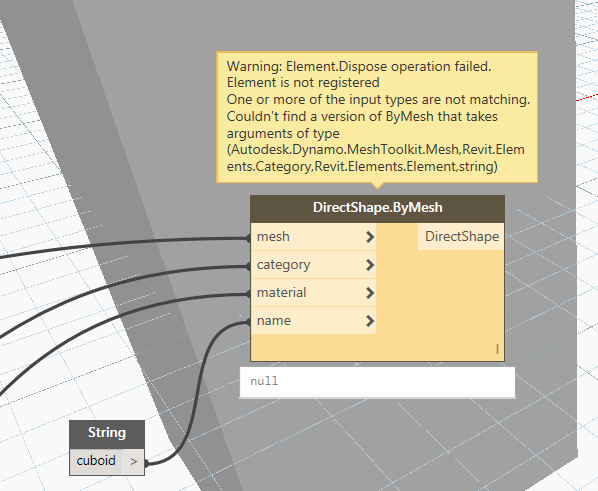
---
### Author:  [@Yna\_Db](https://forum.dynamobim.com/u/Yna_Db)
#### Post date: [January 13, 2017, 12:26pm UTC](https://forum.dynamobim.com/t/mesh-to-directshape/8844/4 "2017-01-13T12:26:01Z")
Yes, it seems so indeed:
> [@Cant get meshtoolkit to work with Mesh from Topo surfaces](https://forum.dynamobim.com/t/cant-get-meshtoolkit-to-work-with-mesh-from-topo-surfaces/1404/2):
>
---
### Author:  [@Kulkul](https://forum.dynamobim.com/u/Kulkul)
#### Post date: [January 13, 2017, 12:26pm UTC](https://forum.dynamobim.com/t/mesh-to-directshape/8844/5 "2017-01-13T12:26:26Z")
Hi @gerry
Could you please drop your files here. Thanks 🙂
---
### Author:  [@Mostafa\_El\_Ayoubi](https://forum.dynamobim.com/u/Mostafa_El_Ayoubi)
#### Post date: [January 13, 2017, 12:31pm UTC](https://forum.dynamobim.com/t/mesh-to-directshape/8844/6 "2017-01-13T12:31:53Z")
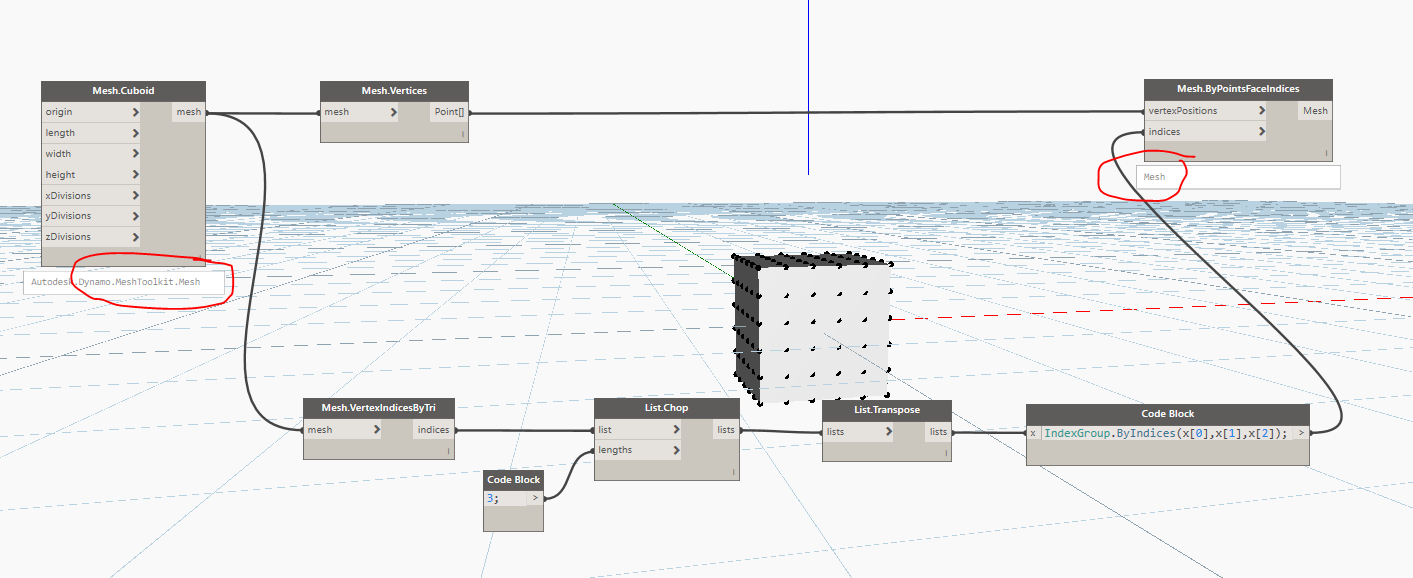
I think the problem here is that DirectShape.ByMesh expects a Dynamo Mesh. MeshToolKit Meshes are a different class of mesh. You need to convert from MeshToolKitMesh to Dynamo Mesh like this :
---
### Author:  [@gerry](https://forum.dynamobim.com/u/gerry)
#### Post date: [January 13, 2017, 12:41pm UTC](https://forum.dynamobim.com/t/mesh-to-directshape/8844/7 "2017-01-13T12:41:07Z")
Thanks
Yes I tried to do that but my experience with dynamo is so low (started today)
that I was not able to figure how to convert meshes.
I will give a try
In any case shouldn’t we have a “standard” mesh object to simplify this stuff ?
---
### Author:  [@Kulkul](https://forum.dynamobim.com/u/Kulkul)
#### Post date: [January 13, 2017, 12:48pm UTC](https://forum.dynamobim.com/t/mesh-to-directshape/8844/8 "2017-01-13T12:48:41Z")
@gerry to know more about mesh toolkit i suggest you look here [https://github.com/DynamoDS/Dynamo/wiki/Dynamo-Mesh-Toolkit](https://github.com/DynamoDS/Dynamo/wiki/Dynamo-Mesh-Toolkit)
---
### Author:  [@Mostafa\_El\_Ayoubi](https://forum.dynamobim.com/u/Mostafa_El_Ayoubi)
#### Post date: [January 13, 2017, 12:55pm UTC](https://forum.dynamobim.com/t/mesh-to-directshape/8844/9 "2017-01-13T12:55:01Z")
Well MeshToolKit’s Mesh class comes with a lot of cool methods that designscript mesh doesn’t have so I wouldn’t complain about it but yeah it would definitely be better to unify meshes in dynamo, or at least provide performant nodes to convert them in both directions.
---
### Author:  [@truevis](https://forum.dynamobim.com/u/truevis)
#### Post date: [April 24, 2018, 3:41am UTC](https://forum.dynamobim.com/t/mesh-to-directshape/8844/11 "2018-04-24T03:41:13Z")
> [@gerry](#):
>
> “One of the input types is not matching”
Perhaps your **Material** data type is incorrect; **Material.ByName** takes in a string.
