# DirectShape warning: expects this, but was that
**URL:** https://forum.dynamobim.com/t/directshape-warning-expects-this-but-was-that/53916
**Category:** Geometry
**Created:** [August 10, 2020, 8:37pm UTC](https://forum.dynamobim.com/t/directshape-warning-expects-this-but-was-that/53916 "2020-08-10T20:37:58Z")
**Posts on this page:** 13
**Page:** 1
### Author:  [@rodrigo.bezerra](https://forum.dynamobim.com/u/rodrigo.bezerra)
#### Post date: [August 10, 2020, 8:37pm UTC](https://forum.dynamobim.com/t/directshape-warning-expects-this-but-was-that/53916/1 "2020-08-10T20:37:58Z")
So… I’m importing a obj mesh, so I can push it into a conceptual mass. But I don’t know why DirectShape.ByGeometry node do not work.
_Warning: DirectShape.ByGeometry expects argument type(s) (Geometry, Category, Material, string), but was called with (Autodesk.DesignScript.Geometry.Mesh[], Revit.Elements.Category, Revit.Elements.Material, string)._

[importaObjCriaMeshExportaDirectShape.dyn](https://forum.dynamobim.com/uploads/short-url/agbAQo5LKAcB5mBCCYKU6ZwRfxu.dyn) (17.6 KB)
---
### Author:  [@Thomas\_Mahon](https://forum.dynamobim.com/u/Thomas_Mahon)
#### Post date: [August 10, 2020, 8:56pm UTC](https://forum.dynamobim.com/t/directshape-warning-expects-this-but-was-that/53916/2 "2020-08-10T20:56:20Z")
Mesh doesn’t inherit from Dynamo’s ProtoGeometry Geometry base class, so its an invalid input. You’ll need to find a way of converting it to one of the entity types you see OOTB under Dynamo’s Geometry node library.
---
### Author:  [@rodrigo.bezerra](https://forum.dynamobim.com/u/rodrigo.bezerra)
#### Post date: [August 10, 2020, 9:06pm UTC](https://forum.dynamobim.com/t/directshape-warning-expects-this-but-was-that/53916/3 "2020-08-10T21:06:42Z")
Do you mean like this:

---
### Author:  [@Thomas\_Mahon](https://forum.dynamobim.com/u/Thomas_Mahon)
#### Post date: [August 10, 2020, 9:09pm UTC](https://forum.dynamobim.com/t/directshape-warning-expects-this-but-was-that/53916/4 "2020-08-10T21:09:16Z")
Doesn’t look like it unfortunately - Solid or Surface do inherit from the Geometry base class, so you could start there

---
### Author:  [@rodrigo.bezerra](https://forum.dynamobim.com/u/rodrigo.bezerra)
#### Post date: [August 10, 2020, 9:13pm UTC](https://forum.dynamobim.com/t/directshape-warning-expects-this-but-was-that/53916/5 "2020-08-10T21:13:46Z")
I so appreciate your help, Thomas, but I have no clue where to find this, 😅
I also tried to push the mesh to Revit with DirectShape.ByMesh and got an similar error about “expect other thing”
Am I not trying something similar like this: [https://www.youtube.com/watch?v=v74AfnZG34o](https://www.youtube.com/watch?v=v74AfnZG34o) ?
---
### Author:  [@Thomas\_Mahon](https://forum.dynamobim.com/u/Thomas_Mahon)
#### Post date: [August 10, 2020, 9:28pm UTC](https://forum.dynamobim.com/t/directshape-warning-expects-this-but-was-that/53916/6 "2020-08-10T21:28:10Z")
Try DirectShape.ByMesh again but you’ll need to be able to convert the mesh from MeshToolkit to a Dynamo mesh (under its geometry node library). Failing that, give that Spring node in the video a shot and you should get a result.
---
### Author:  [@rodrigo.bezerra](https://forum.dynamobim.com/u/rodrigo.bezerra)
#### Post date: [August 10, 2020, 9:35pm UTC](https://forum.dynamobim.com/t/directshape-warning-expects-this-but-was-that/53916/7 "2020-08-10T21:35:43Z")
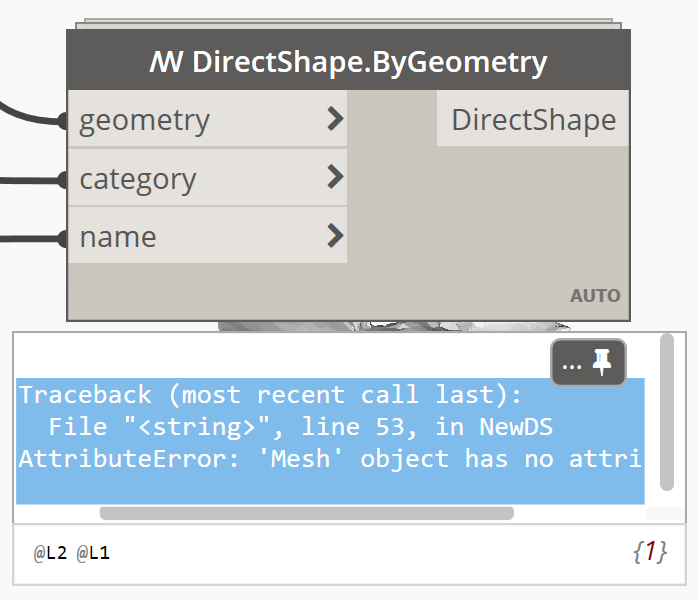
This sequence almost did the trick. No yellow balloon on top of the node…

But got this at the end:
---
### Author:  [@rodrigo.bezerra](https://forum.dynamobim.com/u/rodrigo.bezerra)
#### Post date: [August 10, 2020, 9:47pm UTC](https://forum.dynamobim.com/t/directshape-warning-expects-this-but-was-that/53916/8 "2020-08-10T21:47:13Z")
Now worked. I used information to put another mesh together just to input into DirectShape.ByMesh node.

Other thing I noticed is I must set category to MASS, instead of MASS FORM. And instead of a mesh in a conceptual mass, I now have a mass inside a mass. Makes more sense to put directly into the the project model then.
---
### Author:  [@Thomas\_Mahon](https://forum.dynamobim.com/u/Thomas_Mahon)
#### Post date: [August 10, 2020, 9:49pm UTC](https://forum.dynamobim.com/t/directshape-warning-expects-this-but-was-that/53916/9 "2020-08-10T21:49:28Z")
Exactly as I suggested re the mesh conversion 😉 (a mesh entity from mesh toolkit is not the same as a mesh from Dynamos ProtoGeometry library which is why you saw that exception to begin with).
---
### Author:  [@rodrigo.bezerra](https://forum.dynamobim.com/u/rodrigo.bezerra)
#### Post date: [August 10, 2020, 9:52pm UTC](https://forum.dynamobim.com/t/directshape-warning-expects-this-but-was-that/53916/10 "2020-08-10T21:52:11Z")
So much detail to pay attention to… It is not easy.
And what about the subcategory issue? Why can’t I specify the geometry to enter Revit as a MASS FORM or another subcategory I create?
---
### Author:  [@Vikram\_Subbaiah](https://forum.dynamobim.com/u/Vikram_Subbaiah)
#### Post date: [August 11, 2020, 4:13am UTC](https://forum.dynamobim.com/t/directshape-warning-expects-this-but-was-that/53916/11 "2020-08-11T04:13:23Z")
> [@rodrigo.bezerra](#):
>
> So much detail to pay attention to
Basically avoid connecting a mesh obtained from the _Mesh Toolkit_ notes to the input of the OOTB _Mesh_ nodes
Instead obtain Vertices (points) and Indices (integers) and recreate the mesh.
Confusing, but once you’re able to distinguish the nodes it should be a little less trouble.

[directShape.dyn](https://forum.dynamobim.com/uploads/short-url/lxZKvY18xUvpkaJ6g4asIWw2UuB.dyn) (33.0 KB)
---
### Author:  [@y.elamri](https://forum.dynamobim.com/u/y.elamri)
#### Post date: [January 5, 2021, 3:42pm UTC](https://forum.dynamobim.com/t/directshape-warning-expects-this-but-was-that/53916/12 "2021-01-05T15:42:20Z")

i have tried this script but i got some errors
---
### Author:  [@y.elamri](https://forum.dynamobim.com/u/y.elamri)
#### Post date: [January 5, 2021, 3:49pm UTC](https://forum.dynamobim.com/t/directshape-warning-expects-this-but-was-that/53916/13 "2021-01-05T15:49:36Z")
I have trued first this script i could have the mesh on Dynamo but into revit always have a problem with direct shape by mesh
thanks for helping !
