# Access the properties of CAD blocks
**URL:** https://forum.dynamobim.com/t/access-the-properties-of-cad-blocks/101212
**Category:** Revit
**Tags:** revit, clockwork, archi-lab, python, dynamo
**Created:** [May 22, 2024, 12:48pm UTC](https://forum.dynamobim.com/t/access-the-properties-of-cad-blocks/101212 "2024-05-22T12:48:46Z")
**Posts on this page:** 11
**Page:** 1
### Author:  [@arqurb](https://forum.dynamobim.com/u/arqurb)
#### Post date: [May 22, 2024, 12:48pm UTC](https://forum.dynamobim.com/t/access-the-properties-of-cad-blocks/101212/1 "2024-05-22T12:48:46Z")
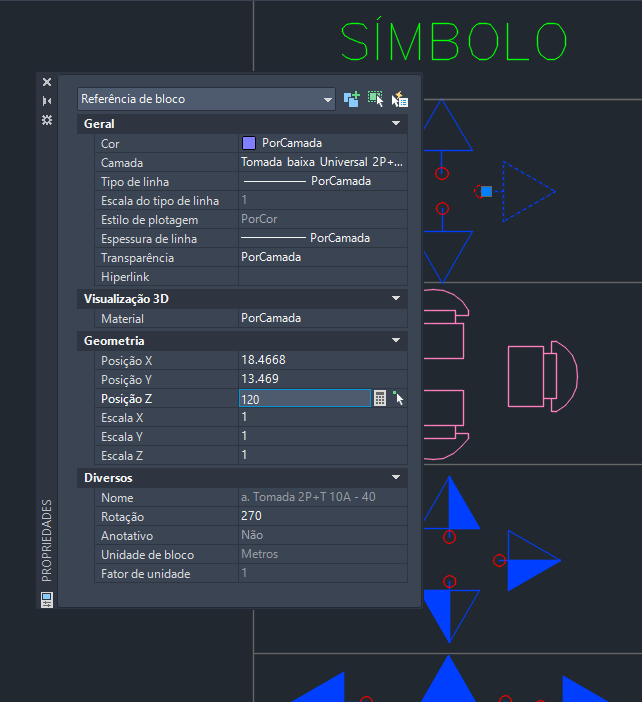
Any help from colleagues will be greatly appreciated. I’ve already tried a few things, with us and Python, but I wasn’t successful, because I don’t even know if it’s actually possible.
" Z" of the blocks to place these families in the z positions according to what is stated in the block reference. So you don’t need to create a family with a z position for each situation. It is possible? Can I read this information and pass it to revit with dynamo?
---
### Author:  [@Draxl\_Andreas](https://forum.dynamobim.com/u/Draxl_Andreas)
#### Post date: [May 22, 2024, 2:14pm UTC](https://forum.dynamobim.com/t/access-the-properties-of-cad-blocks/101212/2 "2024-05-22T14:14:20Z")
@arqurb ,
follow this
> [@Get Attribute from Layer, how?](https://forum.dynamobim.com/t/get-attribute-from-layer-how/95955):
>
> Hello, based on that topic: how can i extent my infos from the .dwg ? i want to get “Bezeichnung” - it is the BlockName. [grafik] face_with_monocle KR Andreas
---
### Author:  [@arqurb](https://forum.dynamobim.com/u/arqurb)
#### Post date: [May 23, 2024, 7:13pm UTC](https://forum.dynamobim.com/t/access-the-properties-of-cad-blocks/101212/3 "2024-05-23T19:13:49Z")
Thank you for the information and help, but unfortunately I was unable to do so, I tried using this link and others linked to it, but without success. I found it quite confusing.
@RMohareb Can you help me?
---
### Author:  [@Mike.Buttery](https://forum.dynamobim.com/u/Mike.Buttery)
#### Post date: [May 23, 2024, 11:53pm UTC](https://forum.dynamobim.com/t/access-the-properties-of-cad-blocks/101212/4 "2024-05-23T23:53:15Z")
Genius Loci has the _CAD Block_ node which can extract the block name, origin, rotation and layer
---
### Author:  [@RMohareb](https://forum.dynamobim.com/u/RMohareb)
#### Post date: [May 24, 2024, 6:07am UTC](https://forum.dynamobim.com/t/access-the-properties-of-cad-blocks/101212/5 "2024-05-24T06:07:51Z")
@arqurb you can use Genius pal as @Mike.Buttery refer or my pak “Brimohareb\_XXXX”


---
### Author:  [@arqurb](https://forum.dynamobim.com/u/arqurb)
#### Post date: [May 24, 2024, 12:53pm UTC](https://forum.dynamobim.com/t/access-the-properties-of-cad-blocks/101212/6 "2024-05-24T12:53:06Z")

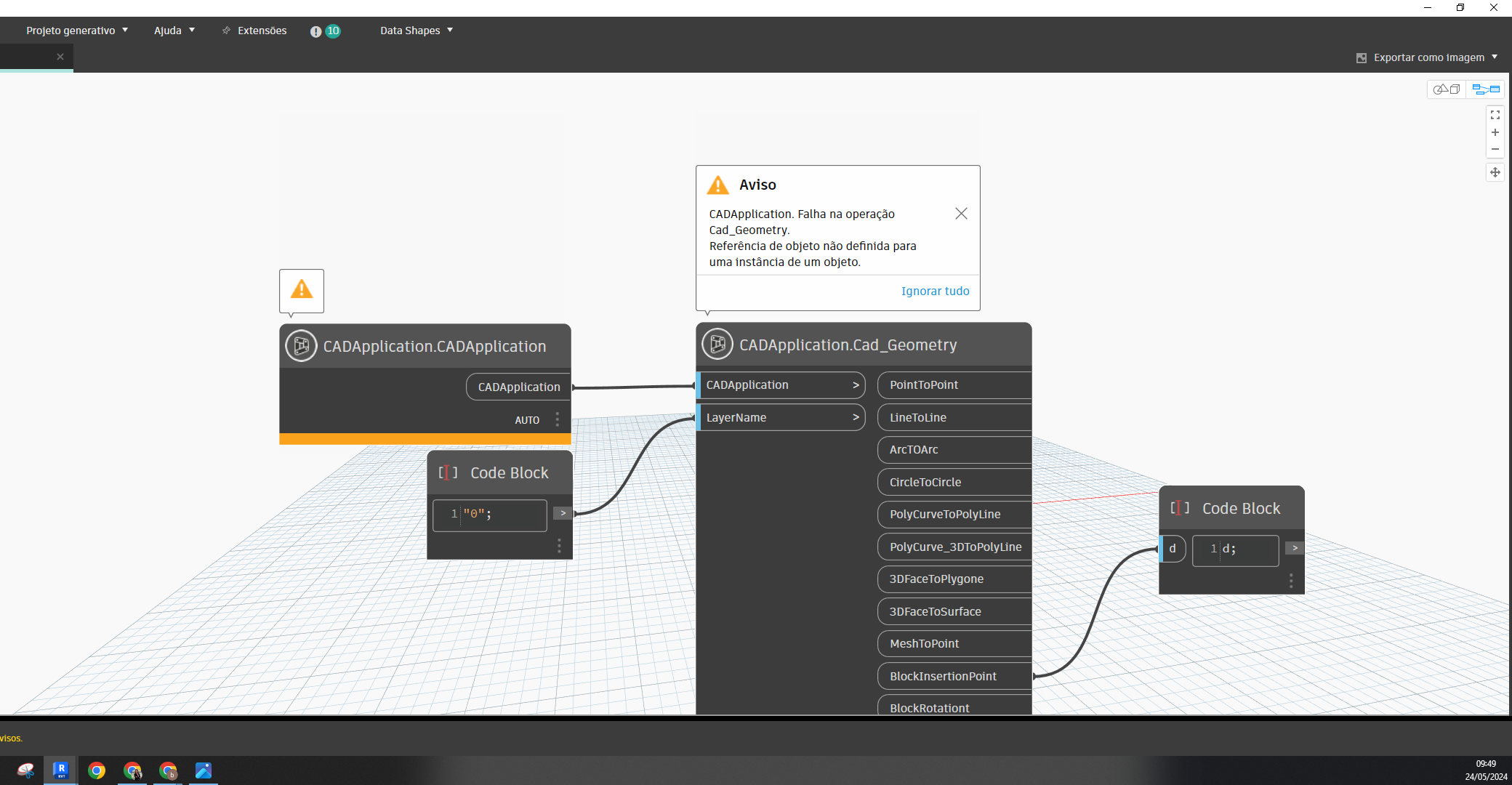
Thank you for the response and help. But I had already tried it this way. But the following error occurs; .ctor operation failed. Operation not available.
and also the error;
Cad\_Geometry operation failed.
Object reference not set to an instance of an object.
Errors that I have no idea what they could be.
---
### Author:  [@RMohareb](https://forum.dynamobim.com/u/RMohareb)
#### Post date: [May 24, 2024, 12:55pm UTC](https://forum.dynamobim.com/t/access-the-properties-of-cad-blocks/101212/7 "2024-05-24T12:55:08Z")
which revit ver. did you use?
---
### Author:  [@arqurb](https://forum.dynamobim.com/u/arqurb)
#### Post date: [May 24, 2024, 1:06pm UTC](https://forum.dynamobim.com/t/access-the-properties-of-cad-blocks/101212/8 "2024-05-24T13:06:55Z")
2023
---
### Author:  [@RMohareb](https://forum.dynamobim.com/u/RMohareb)
#### Post date: [May 24, 2024, 1:30pm UTC](https://forum.dynamobim.com/t/access-the-properties-of-cad-blocks/101212/9 "2024-05-24T13:30:53Z")
you need to open civil3d file at the same time when you run from dynamo revit
---
### Author:  [@arqurb](https://forum.dynamobim.com/u/arqurb)
#### Post date: [May 24, 2024, 1:38pm UTC](https://forum.dynamobim.com/t/access-the-properties-of-cad-blocks/101212/10 "2024-05-24T13:38:42Z")
Oh yes, I don’t use civil 3d, I have no knowledge of it. I thought I could only do it through revit and dynamo. What a shame. Thanks
---
### Author:  [@RMohareb](https://forum.dynamobim.com/u/RMohareb)
#### Post date: [May 24, 2024, 1:51pm UTC](https://forum.dynamobim.com/t/access-the-properties-of-cad-blocks/101212/11 "2024-05-24T13:51:01Z")
Just open the file at the same time when you run revit dynamo